
A warm transfer is an attended handoff where the transferring agent briefs the receiving colleague before connecting the caller, so the customer never has to repeat their story. It lifts customer satisfaction, cuts re-contact rates and shortens resolution times on complex or emotional calls. Use it whenever the issue is sensitive, escalated, or high-value; skip it for simple routing where speed beats context. The scripts, timing rules and QA methods below make it repeatable.
TL;DR:
- Warm transfers are ideal for emotional, high-value, or complex issues to ensure continuity and increase first contact resolution rates.
- Briefing agents in 30 seconds with key details reduces handling time and prevents loss of context, improving customer satisfaction.
- Use warm transfers for escalations, billing disputes, technical issues, distressed callers, and VIP accounts, but skip during peak queues or simple routing.
- Confirm the receiving agent’s availability before transferring and log detailed notes immediately after the call to maintain accurate records.
- AI tools can support warm transfers by providing instant context, automatic transcripts, and drafting briefings, enabling scalable and consistent handoffs.
WattleKeep Human Handoffs In ContextWattle supports warm transfers with staff handoff options, call summaries, transcripts, and captured customer details in one workspace.See how Wattle works
Table of Contents
- What is a warm transfer call and how does the process work?
- Warm transfer vs cold transfer: which one fits the moment?
- What are the real benefits of warm transfers for CX?
- When should you actually use a warm transfer?
- How to run a warm transfer: the step-by-step best-practice checklist
- Scripts you can use on the next call
- How do you measure and improve transfer quality?
- Where AI removes friction from human handoffs
- Two experiments worth running this quarter
- How Wattle keeps warm transfers reliable as call volume grows
- Sources
What is a warm transfer call and how does the process work?
A warm transfer puts the receiving agent in the picture before the caller ever reaches them. Compare that to a cold transfer, where the call gets routed with zero context and the customer starts from scratch, usually while irritated at having to explain themselves twice.
The mechanics are consistent across most contact centre platforms, whether an agent is working from a physical desk phone or a cloud system like Five9.
- Identify that the call needs transferring, based on complexity, authority, or specialty.
- Ask the caller’s permission before doing anything else.
- Place the caller on hold.
- Call or message the receiving agent directly.
- Deliver a short briefing covering who the caller is and what they need.
- Confirm the receiving agent is ready and available.
- Connect the caller and formally hand over.
You’ll also hear this called an “attended” or “consultative” transfer. Some teams run a three-way conference instead of a strict handoff, and others use a supervised transfer where a manager listens in without speaking.
Warm transfer vs cold transfer: which one fits the moment?
Speed and context sit at opposite ends of a trade-off, and picking the wrong one costs you either time or trust. A cold transfer is faster for the agent but riskier for the customer relationship. A warm transfer takes longer up front but usually avoids the frustration of a second explanation.
Three quick checks decide which type to use:
- Is the issue emotionally charged or financially sensitive? If yes, warm transfer, every time.
- Did the caller ask for a specific person by name? A quick blind transfer is often fine if that person is expecting the call.
- Is your queue in a peak overflow period? Cold transfers may be the pragmatic choice, but flag the account so the next agent has some warning.
Emergencies, simple department routing, and cases where the caller already knows exactly who they need lean cold. Billing disputes, escalations, and distressed callers lean warm, a pattern confirmed by TTEC’s guidance on transfer timing.
What are the real benefits of warm transfers for CX?
Warm transfers move the needle on the metrics that actually reflect customer experience: first contact resolution, re-contact rate, and satisfaction scores. When a receiving agent already knows the account history and the problem, the caller doesn’t repeat themselves, doesn’t repeat their frustration, and doesn’t have to re-establish trust from zero.
The trade-off is time. A warm transfer adds handling time compared with a cold one, because someone has to brief someone else before the call even connects. That cost is real, but it’s usually smaller than the downstream cost of a customer who calls back a second time because the first handoff lost context.
The maths that matters: A briefing that adds 30 seconds to average handle time is cheap next to a full repeat call that adds minutes and damages sentiment. Contact centres that track re-contact rates alongside AHT tend to find warm transfers pay for themselves on complex queries.
There’s a softer benefit too. Customers read a well-briefed receiving agent as competence. It signals the business is organised, that the caller matters enough for someone to take five minutes to get the story straight before picking up. That perception carries weight well beyond the single call.
When should you actually use a warm transfer?
Certain situations call for a warm handoff almost automatically. Others don’t justify the extra time.
Use a warm transfer when you’re dealing with:
- An escalation where the caller is already frustrated with a previous interaction.
- A billing dispute involving account-specific numbers or history.
- A technically complex issue outside your training or system access.
- An upset or distressed caller who needs continuity of tone, not just information.
- A VIP or high-value account flagged for priority handling.
Skip it, or at least don’t force it, when the transfer is genuinely simple, when the caller explicitly names the person they want (and that person is available), or during peak triage periods where speed protects the whole queue. When a warm transfer isn’t practical, offer a callback, take detailed notes for a voicemail handoff, or follow up through chat or SMS rather than dropping the caller cold, an approach GoTo Connect also recommends as a fallback.
How to run a warm transfer: the step-by-step best-practice checklist
Most warm transfers fail for one of three reasons: the agent skips permission, the briefing runs too long or too vague, or the receiving agent turns out to be unavailable and the caller lands in voicemail with no warning. Fix those three points and the rest tends to fall into place.
- Ask permission before you touch hold. Tell the caller who you’re connecting them to and why. This alone prevents most of the frustration associated with transfers.
- Check availability before you commit. A quick internal message or status check avoids the classic voicemail drop, where a caller sits on hold only to be dumped into an answering service.
- Brief in 30 seconds, not three minutes. Cover six things: the caller’s name, account or reference number, a one-line issue summary, what’s already been tried, the urgency or emotional temperature, and your suggested next action. Call Centre Helper’s research backs this exact structure as the practical sweet spot.
- Watch the clock on hold. If the caller has been waiting more than two minutes, check back in, apologise for the delay, and offer a callback if the wait looks like stretching further.
- Confirm the handoff out loud. Tell the caller the new agent’s name and that they’re now connected, so there’s no confusion about who’s speaking.
- Wrap up with a CRM note. Log what happened, what was briefed, and what’s still outstanding, immediately after the call ends, not at the end of shift when details have faded.
Pro Tip: Write your 30-second briefing template on a sticky note or pin it in your knowledge base. Agents who rehearse the six elements out loud a few times internalise the rhythm fast, and briefings stop running long.
Scripts you can use on the next call
Scripts remove hesitation, and hesitation is where most transfer etiquette breaks down. OnSIP’s etiquette guidelines back all four of the templates below.
- Permission: “I’d like to connect you with our billing specialist who can sort this faster than I can. Is that alright?”
- For an upset caller: “I can hear this has been frustrating, and I want to make sure you get the right person straight away. Give me one moment to fill them in so you don’t have to repeat everything.”
- Briefing the receiving agent: “This is Sarah, account 4471, calling about a duplicate charge from last Tuesday. She’s already tried the self-service refund and it didn’t process. She’s frustrated but reasonable. Can you take it from here?”
- Wrap-up before connecting: “Thanks for your patience. I’ve got James ready to help, and he’s fully up to speed. Connecting you now.”
How do you measure and improve transfer quality?
Five metrics tell you whether your warm transfer process is actually working: CSAT on transferred calls, first contact resolution, re-contact rate within 24 to 48 hours, successful connection rate (calls that don’t end up in voicemail or dropped), and average hold time during the handoff itself.
QA sampling doesn’t need to be complicated. Reviewing 10 to 20 calls a week is enough to spot patterns, provided you’re checking the same things every time:
- Did the agent ask permission before placing the caller on hold?
- Was the briefing complete, covering all six elements, or did it skip urgency or next steps?
- Did the agent check availability first, or did the caller land in voicemail?
- Was hold time under two minutes, and if not, did the agent check back in?
Score each call against that checklist, then feed the patterns straight into coaching. If some sampled calls skip the urgency flag in the briefing, that’s a training session, not a footnote in a monthly report. A tight feedback loop, where findings turn into a specific coaching point within the week rather than sitting in a quarterly review, is what actually shifts behaviour on the floor.
Where AI removes friction from human handoffs
Most transfer failures aren’t about agent skill. They’re about context getting lost between systems, or between one person’s memory and another’s. Technology can close that gap without removing the human judgement that makes a warm transfer worth doing.
Features worth prioritising if you’re evaluating a platform or upgrading your current one:
- Instant context push, so the receiving agent sees account history the moment the call arrives, not after a manual lookup.
- Auto-generated call transcripts and summaries, so nothing depends on one agent’s memory of the details.
- Human handoff controls that ring a specific colleague and wait for acceptance rather than blind-routing.
- A unified inbox pulling calls, chat and messages into one customer thread, so context doesn’t live in five different tools.
- Calendar and ticketing integrations that let the receiving agent see what’s already booked or logged before they even pick up.
AI can now draft that 30-second briefing automatically, pulling the caller’s name, account status, and recent history into a summary the receiving agent reads in seconds using efficient visit report templates. That’s not a replacement for judgement. It’s a shortcut past the busywork that makes agents rush briefings in the first place. Get recording and data-sharing opt-ins sorted before you switch anything on, and set clear rules for when a call should escalate to a human rather than stay with an AI agent.
Pro Tip: If you’re testing an AI-assisted handoff, start with your highest-volume simple transfers, not your most complex ones. You want to trust the system before you hand it your VIP accounts.
Two experiments worth running this quarter
The teams that improve fastest don’t overhaul everything at once. They test one variable at a time. Try running an A/B split on briefing length, ten seconds versus thirty, and check whether shorter briefings actually hurt first contact resolution or just feel rushed to the agents doing them. Separately, compare scripted transfers against freehand ones for a fortnight and see which produces fewer callbacks.
Pair that with a short weekly coaching cadence, five minutes on one specific behaviour rather than a broad review. And make good handoffs visible. When an agent nails a tricky transfer, say so in the team channel. Culture shifts faster through recognition than through another policy document nobody reads.
— Christopher
How Wattle keeps warm transfers reliable as call volume grows
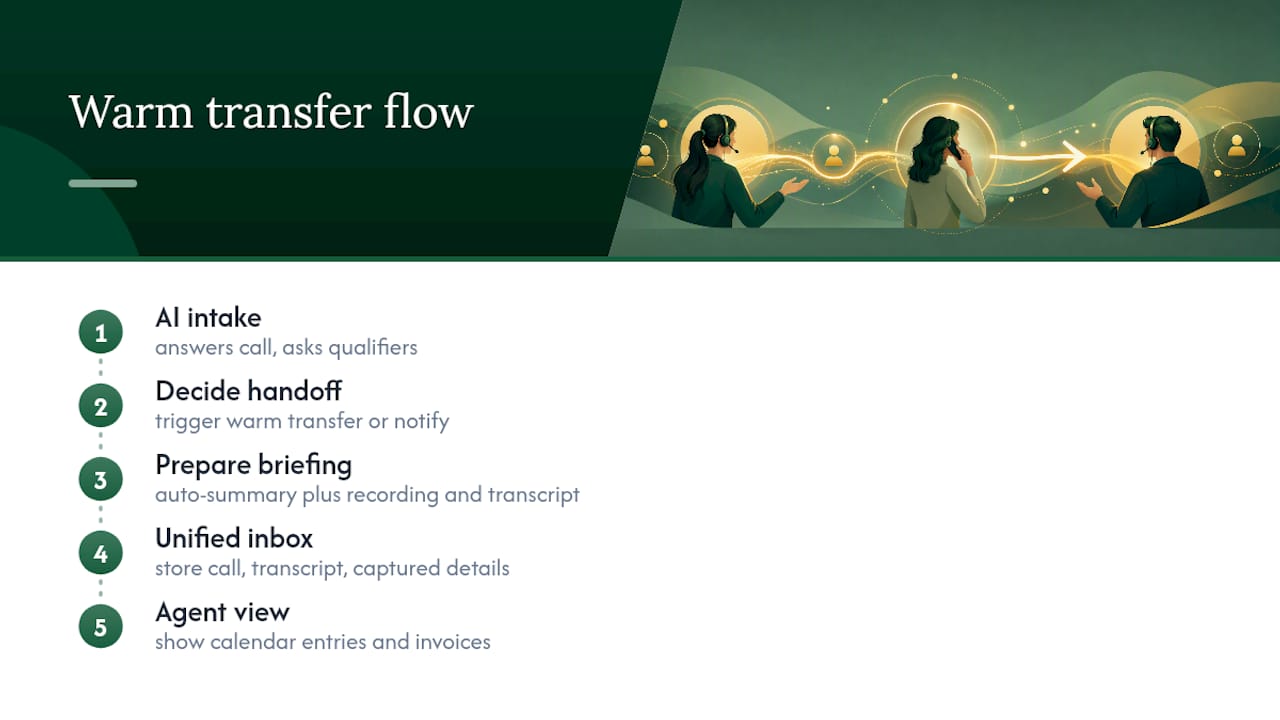
Manual briefings work fine at low volume and start breaking down the moment your team scales past what one person can track in their head. AI voice agents can pick up the first call, ask qualifying questions, and hand off to a human only when the conversation genuinely needs one, complete with a summary already written up. Handoff controls can be configured to trigger warm transfers versus simple staff notifications, helping ensure context is not lost on a colleague’s desk.
Calls from various channels can land in a single inbox with call recordings, transcripts, and attached captured details. That solves the exact problem this article has been circling: context getting lost between the first touchpoint and the person who finally resolves it. Calendar and payment integrations can enable the receiving agent to see relevant bookings or invoices alongside the briefing.
If your team is fielding enough calls that manual briefings are starting to slip, have a look at how Wattle’s voice agents handle handoff and see whether it fits your workflow.
Sources
For deeper detail on transfer etiquette and the dos and don’ts agents should train on, OnSIP’s guide is worth bookmarking. NICE’s glossary breaks down the terminology differences in more depth, useful for onboarding new hires. For the QA sampling and timing rules referenced throughout this piece, including the 30-second briefing and two-minute check-in, Call Centre Helper’s original research remains the clearest practitioner source available.