
Omnichannel customer service means every phone call, chat, WhatsApp message and text a customer sends flows into one connected record, so the context follows them regardless of which channel they picked. Get it right and the payoff shows up fast: fewer repeat calls, faster resolutions, and CSAT scores that improve because the customer never has to explain themselves twice. AI and unified data platforms are what make this possible at scale, turning scattered conversations into one coherent thread.
TL;DR:
- Connecting the top two channels with the highest repeat contacts first can lead to rapid improvements in customer satisfaction and reduced resolution time.
- A true omnichannel platform integrates a unified inbox, CRM, routing, and knowledge base with retrieval-augmented generation to ensure context persists across all channels.
- Implementing phased automation on high-volume, low-complexity workflows delivers quicker ROI and builds trust among staff for broader system adoption.
- Security measures like encrypted storage, access controls, audit trails, and verified AI grounding are essential for responsible, compliant omnichannel operations.
- Key metrics to monitor include CSAT, first contact resolution, repeat contact rate, and cost per contact, because they directly reflect customer experience and operational efficiency.
WattleConnect Every Customer ConversationWattle brings calls, website chats, WhatsApp, and SMS into one inbox, with AI agents that book appointments and hand over complex conversations.Explore Wattle
Table of Contents
- What omnichannel customer service actually means (and how it differs from multichannel)
- The business case: what omnichannel actually delivers
- The technical architecture behind a true omnichannel setup
- Building it in phases: a practical implementation roadmap
- Evaluating platforms: a capability checklist, not a vendor shortlist
- Which metrics actually prove omnichannel is working
- Where omnichannel projects stall, and how to avoid it
- How Wattle’s architecture maps to this roadmap
- Mapping the customer journey and personalising it
- Training staff and breaking down internal silos
- Connecting offline and online channels without losing context
- Where leaders should invest first
- Get your AI front desk running across every channel
- Sources
- FAQ
What omnichannel customer service actually means (and how it differs from multichannel)
Omnichannel customer service is the practice of connecting every customer touchpoint, phone, web chat, WhatsApp, SMS, email, into a single customer record so context carries across all of them. The customer-centred version of this definition matters more than the technical one: it is not about how many channels you offer, it is about whether the business remembers what happened last time regardless of where the conversation started.
Picture three journeys. A customer books a service call over the phone, then texts to reschedule, then messages via WhatsApp to confirm the technician’s arrival time. In a true omnichannel setup, whoever answers that WhatsApp message already sees the booking history and the reschedule request. In a second scenario, a website chat visitor abandons a query mid-conversation and picks it up later by phone. A connected system recognises the account and resumes where they left off. In a third, a customer lodges a complaint by email and follows up on social media. A shared inbox for support means the second agent isn’t starting from zero.
Multichannel is the opposite of that experience. It offers the same list of channels, phone, chat, email, but each one runs as its own silo with its own history and its own agent queue. The customer has to repeat themselves every time they switch, which is precisely what drives complaint volume up.
The practical differences show up here:
- Data: Omnichannel keeps one unified customer profile; multichannel keeps separate logs per channel.
- Handoffs: Omnichannel preserves context when a conversation moves channels; multichannel loses it.
- Routing: Omnichannel uses AI and rules to direct enquiries to the right person or bot; multichannel routes by channel alone.
- Measurement: Omnichannel tracks the customer’s full journey; multichannel tracks channel performance in isolation.
AI is what makes the omnichannel version practical rather than aspirational. Natural language processing can read intent from a WhatsApp message, pull the matching CRM record, and route it to the agent who handled the original phone call, all before a human even opens the thread.
The business case: what omnichannel actually delivers
Mature omnichannel operations report significant CSAT improvements, alongside meaningful cuts in repeat contacts and average handle time, according to contact centre benchmark research. That’s not a marginal gain. It’s the difference between a support function customers tolerate and one they actively trust.
The gap is bigger than most leaders assume. 76% of customers now use more than one channel during a single support interaction, yet only around 35% of companies report having a fully connected cross-channel experience. Most businesses are trying to serve omnichannel behaviour with multichannel infrastructure, and the mismatch shows up directly in CSAT scores.
The efficiency case is just as strong as the experience case, and it’s the one finance teams respond to. Unified context means agents spend less time hunting for history and more time resolving. Fewer repeat contacts translate directly into lower average handle time, and higher agent productivity follows once staff aren’t juggling five disconnected systems to answer one question. Verint’s State of Customer Experience research links unified context and AI assistance to measurable reductions in agent effort and burnout, which matters for retention on your own team, not just your customers’.
Then there’s the cost-shift argument, which is the single most persuasive figure for a budget conversation. Self-service resolutions typically cost between $0.10 and $0.25 each, compared with $8 to $12 for a phone-based resolution, according to the same industry cost analysis. Shift even a modest share of routine queries, password resets, order status, appointment confirmations, to a well-grounded self-service channel, and the savings compound month over month.
When you present this to stakeholders, skip the abstract “improves customer experience” pitch. Show three numbers instead:
- Current cost per contact by channel
- Projected repeat-contact reduction from unified context
- CSAT delta benchmarked against the 25% figure mature operations report
Boards respond to cost per resolution and retention math far more readily than they respond to satisfaction scores alone.
The technical architecture behind a true omnichannel setup
A genuine omnichannel messaging platform rests on four structural pieces, and skipping any one of them turns your “omnichannel” project back into multichannel with better branding.
The unified inbox is the foundation. Every call, SMS, web chat, invoice and payment request against a customer should thread into one continuous conversation view, not four separate tabs. This is what a shared inbox for support actually means in practice: one agent, one screen, the full history.
Sitting behind that inbox, a CRM or customer data platform holds the profile that makes context possible. The integration pattern matters here. Rather than duplicating customer records across five tools, the inbox and the CRM need to reference the same underlying identity, so a phone number captured on a call matches the contact captured through a web form.
Routing and session handoff decide who or what handles each conversation. A well-built cross channel messaging system can recognise when a customer moves from an AI chat to a phone call and route that call to a human with the chat transcript already attached, rather than forcing a cold restart.
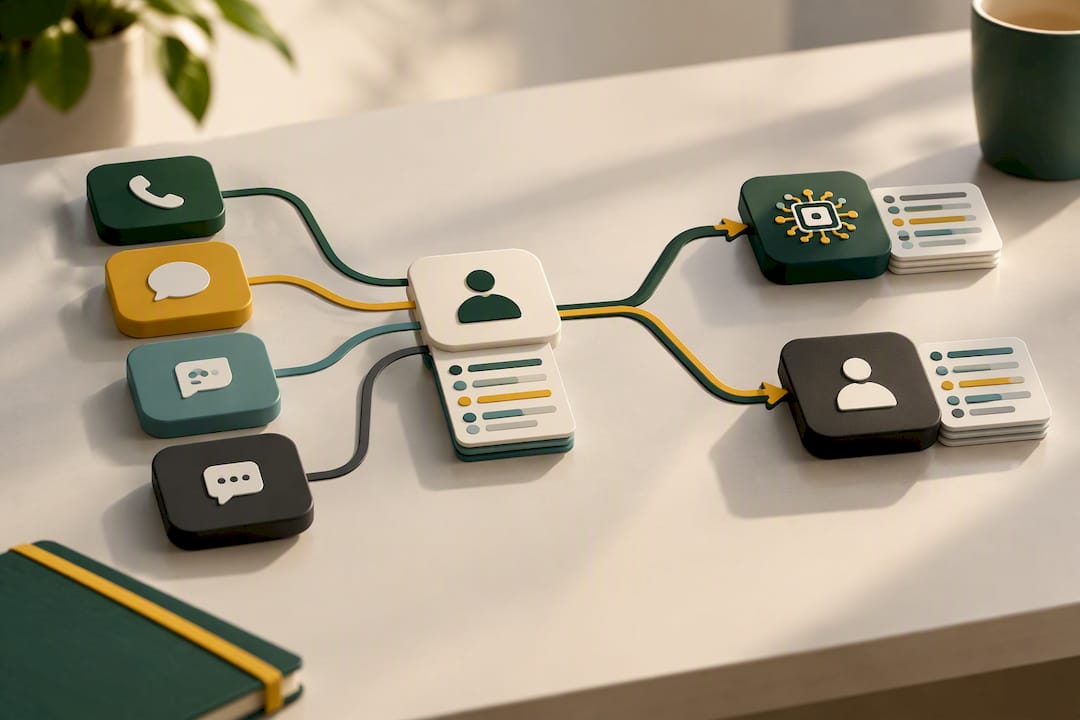
Finally, a knowledge base with retrieval-augmented generation (RAG) grounds AI responses in verified business information rather than generic guesses. This is the difference between an AI agent that quotes your actual opening hours and one that hallucinates them. Trust research from the XM Institute backs this up directly: customers rank accurate, trustworthy information above raw speed, which means an ungrounded AI agent that answers fast but wrong will damage trust faster than a slow human ever could.
Underneath all of it, security and audit requirements aren’t optional extras; building AI-native products with responsible data handling is essential, as outlined by benchmarked.
- Encrypted storage for integration credentials and customer data
- Row-level or tenant-level access controls so data doesn’t leak across accounts
- Audit trails for sensitive actions like refunds, bookings or account changes
- Signed, time-limited URLs for anything sensitive like call recordings
Building it in phases: a practical implementation roadmap
Trying to unify every channel at once is how omnichannel projects stall for eighteen months and get quietly shelved. A phased rollout gets you measurable wins early and buys the credibility to keep going.
-
Audit and quick wins (weeks 1 to 4). Map every channel currently in use, phone, email, web chat, WhatsApp, social, and identify which ones already share no data with each other. Pick the two channels with the highest repeat-contact volume and connect them first. Measure baseline CSAT and average handle time before you touch anything, so you have a number to compare against later.
-
Unified context and routing (months 2 to 4). Build or connect the shared inbox, link it to your CRM, and pilot AI-assisted flows on a narrow, high-volume use case, appointment confirmations or basic enquiry triage work well. Keep human handoff simple and visible during this phase; agents need to trust the system before they’ll rely on it.
-
Scale and integrate (months 4 to 9). Extend automation into booking and payments, connect accounting and calendar tools, and bring in the remaining channels once the core pattern is proven. This is also when enterprise data sources, order history, service records, get wired into the same customer profile.
Change management matters as much as the technical build. Agents who feel replaced will resist adoption; agents who see the AI handle the tedious 40% so they can focus on complex cases will champion it. Build training around that framing from day one, not as an afterthought once the system is live.
Pro Tip: Choose your first automation candidate based on repeat volume, not complexity. A workflow that happens a frequent and predictable pattern, like appointment reminders or order status checks, delivers a faster, more visible win than an ambitious but rare edge case. Verint’s research backs this sequencing: automate high-volume, low-complexity tasks first, then move to harder problems once the team trusts the system.
Evaluating platforms: a capability checklist, not a vendor shortlist
Rather than comparing brand names, evaluate any candidate platform against what it can actually do. This keeps procurement conversations grounded in your actual requirements instead of marketing claims.
The core capability checklist looks like this:
- Unified inbox that threads calls, SMS, web chat and payment activity into one customer view
- Voice and messaging in the same platform, not a phone system bolted onto a separate chat tool
- API-first architecture so it connects to your existing calendar, accounting and CRM systems rather than forcing a migration
- Knowledge grounding (RAG) so AI responses draw from your actual business information
- Payment and booking actions built into the conversation flow, not requiring a handoff to a separate system
- Calendar syncing for real-time availability rather than a manual back-and-forth
Integration patterns are where most platforms differentiate. Look for native connectors to calendar tools like Google Calendar or Cal.com, accounting platforms such as Xero or QuickBooks, and workflow automation tools like Zapier or n8n. Industry analysis consistently recommends wiring omnichannel platforms into existing CRMs and business tools rather than replacing them, since that preserves context and automates handoffs without a disruptive rip-and-replace.
On evaluation criteria, weigh scalability against your actual call volume growth, check what SLA the vendor commits to for uptime, and confirm security controls, encryption at rest, tenant isolation, audit logging, are documented rather than assumed. Testability matters too: can you run a browser-based test call or sandbox conversation before anything goes live?
Finally, decide where you sit on the CCaaS versus on-premises versus hybrid spectrum. Cloud contact centre as a service (CCaaS) suits most mid-sized service businesses because it scales without hardware investment, while hybrid setups make sense for organisations with strict data residency requirements.
Which metrics actually prove omnichannel is working
Seven metrics matter more than the rest: CSAT, first contact resolution (FCR), average handle time (AHT), repeat contact rate, customer effort score (CES), self-service deflection rate, and cost per contact. Track these across channels, not per channel, or you’ll miss the whole point of going omnichannel.
- CSAT and FCR tell you whether the customer got what they needed without friction
- AHT and repeat contact rate tell you whether unified context is actually reducing agent workload
- Deflection rate and cost per contact tell finance whether the self-service investment is paying for itself
Connect these to revenue rather than treating them as isolated service metrics. OSF Digital’s customer service research makes the case for tying support metrics directly to customer lifetime value and retention, since that’s the framing that gets budget approved.
For dashboard cadence, review CSAT and repeat contact rate weekly, cost per contact and deflection rate monthly, and benchmark against the 25%+ CSAT gains mature operations report roughly once a quarter as your program matures.
Where omnichannel projects stall, and how to avoid it
Legacy systems are the most common blocker. Most businesses have a phone system, a separate email platform and a CRM that were never designed to talk to each other. The mitigation isn’t a full rip-and-replace; it’s choosing an integration layer, often an API-first platform or middleware like Zapier or n8n, that connects what exists rather than forcing a migration all at once.
Agent adoption is the second failure point. Staff who weren’t trained on the new unified inbox will quietly revert to old habits, checking three systems instead of trusting one. Build training time into the rollout, not as a footnote after go-live.
AI grounding risk deserves its own line item. An AI agent that isn’t tied to verified business knowledge will confidently state wrong information, which damages trust faster than slow service ever would. Test conversational flows against real, messy scenarios, not just the happy path, before publishing any agent live.
Privacy and regulatory obligations round out the list. Businesses operating under Australia’s Consumer Data Right need to handle any CDR representative arrangements carefully. The OAIC’s guidance on CDR representative obligations sets out the consent rules and safeguards that apply, and any business handling CDR data should confirm its arrangements meet those requirements before scaling automation.
How Wattle’s architecture maps to this roadmap
Wattle runs as an AI voice agent and messaging platform across phone, website chat, WhatsApp calling and SMS, with every conversation threading into one workspace inbox. That structure lines up directly with the unified inbox and context layer described earlier in this piece.
The call-flow builder handles the routing and handoff mechanics: conversations can escalate to a human through a notification, a blind transfer, or a warm transfer that requires staff to accept before the call connects. Knowledge base grounding through retrieval lets agents answer from a business’s actual information rather than a generic script, addressing the trust risk AI grounding research consistently flags.
On the phased roadmap, Wattle’s integrations, Google Calendar, Cal.com, Xero, QuickBooks, Zapier and n8n, map to the scale phase, where booking and payment actions get wired into the automated flow. Governance controls matter here too: encrypted integration credentials, optional multifactor verification for protected actions like refunds or bookings, and audit events for sensitive operations all support the security requirements any serious omnichannel rollout needs.
Mapping the customer journey and personalising it
Journey mapping starts with listing every point a customer touches your business, first enquiry, booking, service delivery, follow-up, and identifying where channel switches actually happen. Most businesses discover the switches happen at predictable friction points: a customer calls after failing to book online, or texts after being put on hold too long.
Personalisation within an omnichannel setup means using the unified customer profile to skip repetitive questions. If a returning customer’s preferred appointment time and service history are already on file, the AI agent or human staff member should reference that immediately rather than asking again. This is where a unified inbox for customer service earns its keep: personalisation isn’t a marketing layer bolted on top, it’s simply not making the customer repeat themselves.
Segment journeys by behaviour rather than demographics where possible. A customer who always books by WhatsApp and pays online has a different journey shape to one who calls, asks questions, then books by phone. Design your default flows around the two or three most common patterns first, then handle exceptions through human handoff rather than trying to automate every edge case from day one.
Training staff and breaking down internal silos
Omnichannel service changes what “customer service training” actually needs to cover. Agents no longer need deep expertise in one channel; they need fluency across the unified inbox and confidence handing off to AI where it’s appropriate and taking over where it isn’t.
This has a direct effect on internal collaboration. When every channel fed a separate queue, teams often organised around channels, a phone team, a chat team, an email team. Unified inboxes remove that structural reason for separation, and the stronger model organises around customer outcomes instead: one team resolving issues regardless of which channel they arrived through.
Training needs to cover three things specifically: how to read a full customer thread quickly (including AI-generated call summaries and transcripts), when to trust an AI handoff versus taking over a conversation directly, and how to use captured customer data without duplicating it manually. Verint’s research on unified context links this kind of training directly to reduced agent burnout, since agents stop wasting effort hunting across systems for information that should already be in front of them.
Connecting offline and online channels without losing context
The businesses that get this wrong treat in-person service as somehow separate from digital channels, when it’s really just another channel that needs the same unified context. A customer who visits a physical location and later calls should not have to re-explain what happened in that visit.
The practical fix is capturing offline interactions into the same customer record the digital channels use. If a staff member takes a note during an in-person conversation, that note needs to land in the same profile a phone agent or AI chat would see later. This is straightforward with a CRM-integrated system and genuinely difficult without one, which is why the unified customer profile described earlier in this piece isn’t optional infrastructure, it’s the thing that makes offline and online integration possible at all.
Missed-call follow-up is a good example of this working well. A business that automatically sends a text after a missed call, referencing the fact that no one picked up, closes a gap that used to mean a lost enquiry entirely. The follow-up SMS becomes part of the same thread as any later call or booking, rather than a disconnected one-off message.
Staff need clear rules for when to log an offline interaction and how. Vague instructions like “note anything important” lead to inconsistent records; specific prompts, capture the reason for the visit, any commitment made, and the next expected action, produce records the next agent can actually use.
Where leaders should invest first
Unify customer context before you automate anything, self-service only works once the data behind it is trustworthy. Use a simple impact versus feasibility matrix to pick your first pilot: high customer impact, low technical lift wins every time over an ambitious project that takes a year to prove itself. Start with the workflow customers hit most often, not the one that looks most impressive in a board deck.
— Christopher
Get your AI front desk running across every channel
Wattle gives you one place to manage the exact buyer jobs this article has walked through: AI voice agents that answer calls and qualify enquiries, a unified inbox threading phone, web chat, WhatsApp and SMS into a single customer view, and built-in booking and payment collection so conversations turn into confirmed jobs without a manual handoff.
Where a traditional support setup means separate tools for calls, chat and messaging, Wattle’s positioning is unified omnichannel communication with a single inbox for every interaction, customisable AI agents, and direct integrations with the calendar, accounting and workflow tools you already use. Plans start at $99 A$ per month on the Starter tier, scaling through Pro at $499 A$ and Max at $999 A$ depending on call volume and features needed. If you’re ready to see how the unified inbox and call-flow builder work in practice, check the Wattle platform overview or head straight to the pricing page to compare plans against your current call volume.
Sources
For privacy obligations around Consumer Data Right arrangements, see the OAIC’s CDR representative guidance and its guide to developing a CDR policy. For benchmark data on CSAT and cost per contact, see Udesk’s 2026 contact centre benchmarks and Stealth Agents’ omnichannel support statistics. For customer trust research, see the XM Institute’s channel preferences study.
- CDR representative model: privacy obligations of a CDR representative | OAIC
- XM Institute channel preferences and priorities research 2025
- Omnichannel Support Statistics 2026: Data | Stealth Agents
- How Omnichannel Contact Centers Boost CSAT by 25%+ (2026 Benchmarks)
FAQ
What is omnichannel in simple terms?
Omnichannel means every channel a customer uses to reach you, phone, chat, WhatsApp, SMS, feeds into one connected record, so the person helping them always sees the full history. It’s the difference between a business that remembers you and one that makes you start over every time.
Is omnichannel a CRM?
No, a CRM is one component of an omnichannel setup, not the whole system. Omnichannel needs a unified inbox, routing logic and often an AI layer sitting on top of the CRM data to actually connect conversations across channels in real time.
Can you give me an example of an omnichannel goal?
A realistic goal is reducing repeat contacts by connecting your two highest-volume channels first, then measuring the change in average handle time and CSAT. Benchmarks show mature omnichannel operations achieve CSAT gains of 25% or more, which is a reasonable target once channels are genuinely unified rather than just co-located.
What is an omnichannel contact centre?
An omnichannel contact centre handles calls, chat, SMS and messaging through one platform with a shared customer view, rather than separate queues for each channel. Platforms like Wattle build this around a unified inbox where calls, WhatsApp, SMS and web chat all thread into a single customer conversation.
How does AI fit into omnichannel customer service?
AI handles routing, answers routine questions from a grounded knowledge base, and hands off to a human when a conversation needs judgement or gets sensitive. Customers consistently rank trust in the accuracy of information above raw speed, so grounding AI responses in verified business knowledge matters more than how fast it replies.