
Intelligent call routing uses AI and real time customer context, things like intent, sentiment and CRM history, to connect a caller to the person or resource best placed to solve the problem, rather than the next free agent. The outcome shows up in the numbers that matter: higher first call resolution, fewer transfers and reduced repetition explaining issues.
TL;DR:
- Intelligent call routing leverages AI analysis of customer intent and sentiment in real-time, not just static queue positions, to improve accuracy.
- Integration depth with CRM, real-time analytics, and fallback logic are crucial features to ensure reliable operation and data quality.
- Typical pilots last 30 to 60 days, focusing on key measures like first call resolution, transfer rate, and customer satisfaction before expansion.
- Data accuracy, skill tagging, and explicit fallback rules are common failure points that can undermine routing effectiveness if not properly managed.
- Future trends include predictive routing based on resolution outcomes, real-time sentiment escalation detection, and conversational AI handling the flow end-to-end.
WattleRoute More Calls To The Right PlaceWattle’s AI front desk handles calls, captures customer details, and hands sensitive or complex conversations to your staff.Explore Wattle
Table of Contents
- What is intelligent call routing and how does it work?
- What business outcomes actually come from intelligent routing?
- What features should you look for in an ICR system?
- How do you roll out intelligent call routing without breaking things?
- Which metrics prove intelligent routing is working?
- How does Wattle apply intelligent routing in practice?
- How do the main approaches to intelligent routing compare?
- What goes wrong during intelligent routing rollouts?
- Where is intelligent call routing technology heading?
- Buy, build or partner: a decision framework
- Try intelligent call routing without the build
- Sources
- FAQ
What is intelligent call routing and how does it work?
Legacy automatic call distribution asks one question: who’s free? Automatic call distributors built their reputation on strategies like time based and weighted distribution, cascading a call to the next available agent when the first target doesn’t pick up. That model still runs plenty of contact centres today, and it still works fine for low complexity queues.
Intelligent call routing asks a different question: who’s right? It pulls from a wider set of inputs, caller ID and ANI, DNIS, CRM records, prior contact history, IVR selections or spoken responses, and current agent workload, then applies AI models on top. Salesforce’s breakdown of intelligent routing describes this as routing built on real time customer context rather than a static queue position.
Three layers do the actual work:
- Data inputs. Caller identity, account status, purchase or ticket history, and whatever the caller has already told an IVR or web form.
- AI signal processing. Natural language processing reads intent from spoken or typed input, and sentiment models flag frustration or urgency before a human ever answers. GetVoIP’s analysis of intelligent routing notes that NLP and sentiment scoring can classify a caller’s intent in milliseconds, fast enough to route in real time rather than after the fact.
- Routing logic. Skills based matching pairs the caller with an agent who has the right certification or language. Priority based rules push VIP accounts or high value disputes to the front. Bullseye or relaxed matching widens the pool of eligible agents if a perfect match isn’t available inside a target wait time, and a fallback cascade catches anything that still doesn’t resolve.
None of this works without integration into the systems that already run a contact centre, the CRM, the ACD, the IVR platform, and often a workforce management tool tracking who’s on shift and what they’re rated for. Latency matters here too. A routing decision that takes four seconds to compute is a routing decision the caller has already hung up on. Most production systems target sub second decisioning, which is one reason intelligent routing is usually bought as a platform rather than built as a one off script.
What business outcomes actually come from intelligent routing?
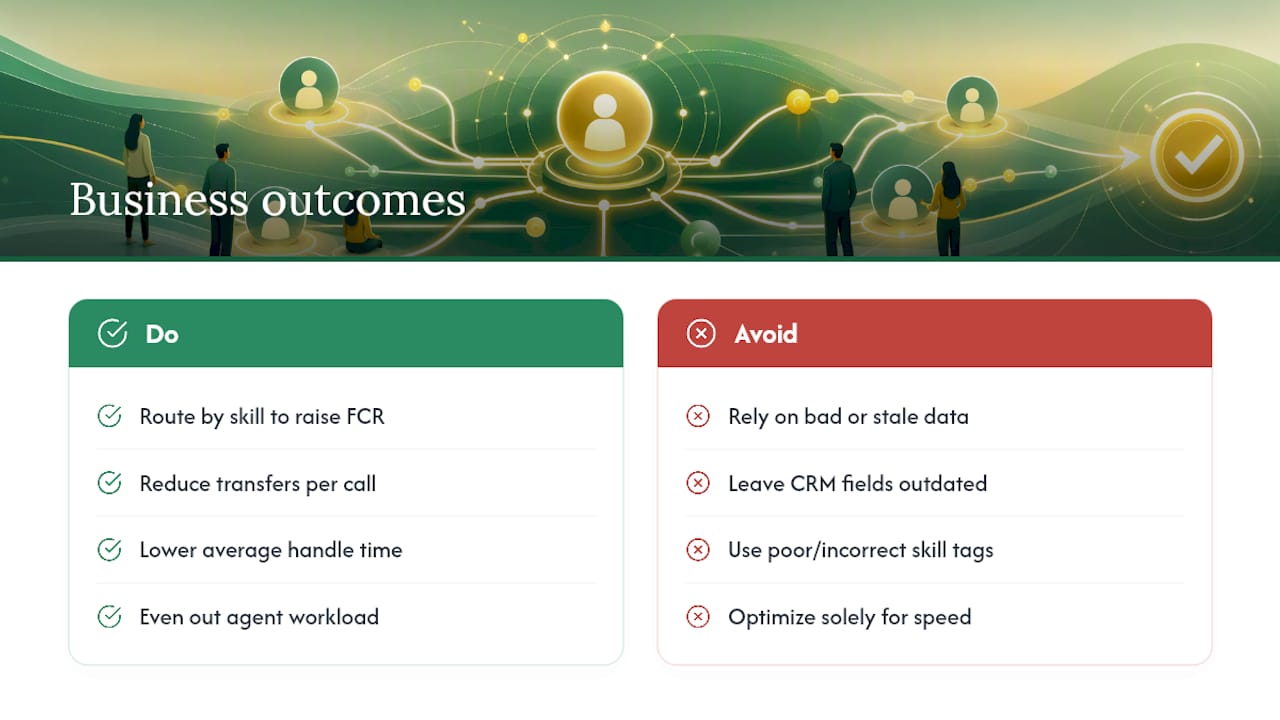
The headline benefit is first call resolution. When a caller with a billing dispute lands with an agent trained on billing disputes instead of whoever picked up first, the problem tends to get solved in one conversation instead of two or three. Fewer transfers follow directly from that, and transfer rate is one of the cleanest proxies for routing quality you can track.
The shift is from volume based routing to value based routing according to Salesforce, which argues the goal should be solving the issue, not simply minimising the seconds a caller waits. A system tuned purely for speed will happily connect a complex technical query to the fastest available generalist, and that call ends up back in the queue twenty minutes later as a second contact.
Average handle time often falls too, though not always immediately. The right agent typically resolves things faster because they aren’t stalling to look something up or transferring blind. Agent workload becomes more even as well, since skills based distribution stops your best problem solvers from being buried while less experienced agents sit idle on calls they can’t close.
Customer satisfaction and NPS improvements tend to follow, but they plateau. Once transfer rate and FCR hit a reasonable baseline, extra routing sophistication produces diminishing returns, and the next gains usually come from agent training or product fixes, not smarter routing rules.
None of this happens automatically. Bad data is the most common failure mode. If a CRM field is wrong or a skill tag hasn’t been updated since an agent’s last training, the router confidently sends the call to the wrong place. Poor skill tagging causes the same problem from a different angle. Intelligent routing amplifies whatever data quality you already have, for better or worse.
What features should you look for in an ICR system?
A feature checklist separates a real intelligent routing platform from a rebadged IVR. Run any vendor or internal build proposal through these points before you sign anything.
- CRM and ticketing integration with a genuinely unified customer profile, not a partial sync that updates once an hour.
- Omnichannel routing across phone, web chat, SMS and messaging apps, feeding into one inbox rather than separate silos per channel.
- A visual call flow builder that lets non-developers map branching logic, conditions and handoff points without waiting on an engineering sprint.
- Human handoff that supports both a quiet notification to a staff member and a full warm transfer, plus the ability for a person to take over an AI-led conversation mid-stream.
- Real time analytics and reporting, ideally with SLA alerting so a queue breach gets flagged before it becomes a customer complaint.
- Security and audit controls, including access permissions, encrypted credentials and a record of who did what to sensitive data.
Two of these deserve a harder look during procurement. Integration depth is often oversold. A vendor demo showing a CRM connector is not the same as that connector handling your specific field structure, custom objects or legacy data formats. Ask for a live test against your actual CRM instance, not a sandbox. Audit trails are the second one worth pressing on, because the day you need to prove what happened on a disputed call is not the day you want to discover logging was optional.
How do you roll out intelligent call routing without breaking things?
Rolling out ICR in one big-bang deployment is how most projects go sideways. A phased approach spreads the risk and gives you real data before the next decision.
- Audit your data first. Check CRM field accuracy, contact history completeness and whether skill tags on agent profiles reflect what they can actually handle today, not what they were hired to do two years ago.
- Build a skills taxonomy. Define the categories a call can be routed against, technical tiers, language, product lines, account value, before you touch routing logic. A vague taxonomy produces vague routing.
- Pick one high value use case for a pilot. GetVoIP’s implementation guidance points to a narrow starting point, appointment booking, billing disputes or VIP support are common choices, with clear success metrics defined before go live.
- Iterate on telemetry, not instinct. Watch FCR and transfer rate weekly during the pilot and adjust routing rules based on what the data shows, not what seemed logical in the planning meeting.
- Train agents on handoff and escalation policy. Staff need to know when a routed call is genuinely urgent versus routine, and what the interception process looks like when an AI system passes a conversation to them.
- Set governance and rollback rules before launch, not after a problem. Decide upfront what triggers a rule change, who approves it, and what conditions justify pulling a routing rule entirely.
Pro Tip: Build your rollback conditions before the pilot starts, not during a live incident. Decide in advance what wait time threshold or error rate triggers a fallback to manual routing, so nobody is improvising that decision while calls are actually queuing.
Data hygiene sits underneath every one of these steps. A single source of truth in the CRM is what lets intent-based routing actually work; without it, the system degrades into rule-based guessing dressed up as AI.
Which metrics prove intelligent routing is working?
Average wait time is the metric everyone watches and the one that tells you the least on its own. GetVoIP’s guidance on measuring routing success is blunt about this: don’t lean on wait time alone, because a system can hit fast connection times while still routing callers to the wrong agent.
Metric What it tells you First call resolution (FCR) Whether the caller’s issue was solved without a follow-up contact Transfer rate How often the first routing decision was wrong Average handle time (AHT) Whether the right-fit agent is resolving issues efficiently Abandonment rate Whether callers are giving up before reaching anyone CSAT / NPS Whether the resolution felt satisfactory to the customer Occupancy / SLA attainment Whether agent workload and service targets are balancedAttribution is the tricky part. A CSAT bump could come from routing, from a product fix, or from a seasonal dip in call complexity. Run routing changes as A/B tests against a control group where possible, and set a rollback trigger, a defined drop in FCR or spike in transfer rate, before you launch any change. Schedule data quality audits quarterly at minimum, since skill tags and CRM fields drift over time even when nobody touches the routing rules themselves.
How does Wattle apply intelligent routing in practice?
Wattle’s platform maps onto the feature checklist in a fairly direct way, which makes it a useful example of what a modern implementation actually looks like day to day.
- Voice agents with configurable flows. Wattle lets a business build multiple AI voice agents, each with its own role, script mode and guardrails, then test them in a browser before publishing.
- A visual call flow builder with branching logic, conditional routing and confirmation steps for anything sensitive, like a booking change or a payment request.
- Human handoff in three modes, a quiet staff notification, a blind transfer, or a warm transfer that rings a team member first and waits for them to accept.
- A unified inbox that pulls calls, SMS, web chat and payment activity into a single customer thread, so nobody’s digging through four systems to reconstruct one conversation.
- Integrations with calendars, spreadsheets and accounting platforms, covering the workflows businesses lean on most: appointment booking, lead capture, invoice delivery and escalation to a human when something falls outside the agent’s guardrails.
On security, the platform runs multi-tenant data isolation, encrypted integration credentials and short-lived signed URLs for call recordings, with audit events logged against sensitive actions.
A sensible pilot runs 30 to 60 days against one queue, appointment bookings is a common starting point, with success measured against FCR, transfer rate and missed-call recovery before expanding to a second channel. You can see the full feature set on the Wattle platform page.
How do the main approaches to intelligent routing compare?
Vendors in this space generally fall into three broad categories, and the right one depends less on budget and more on how much control you need over the routing logic itself.
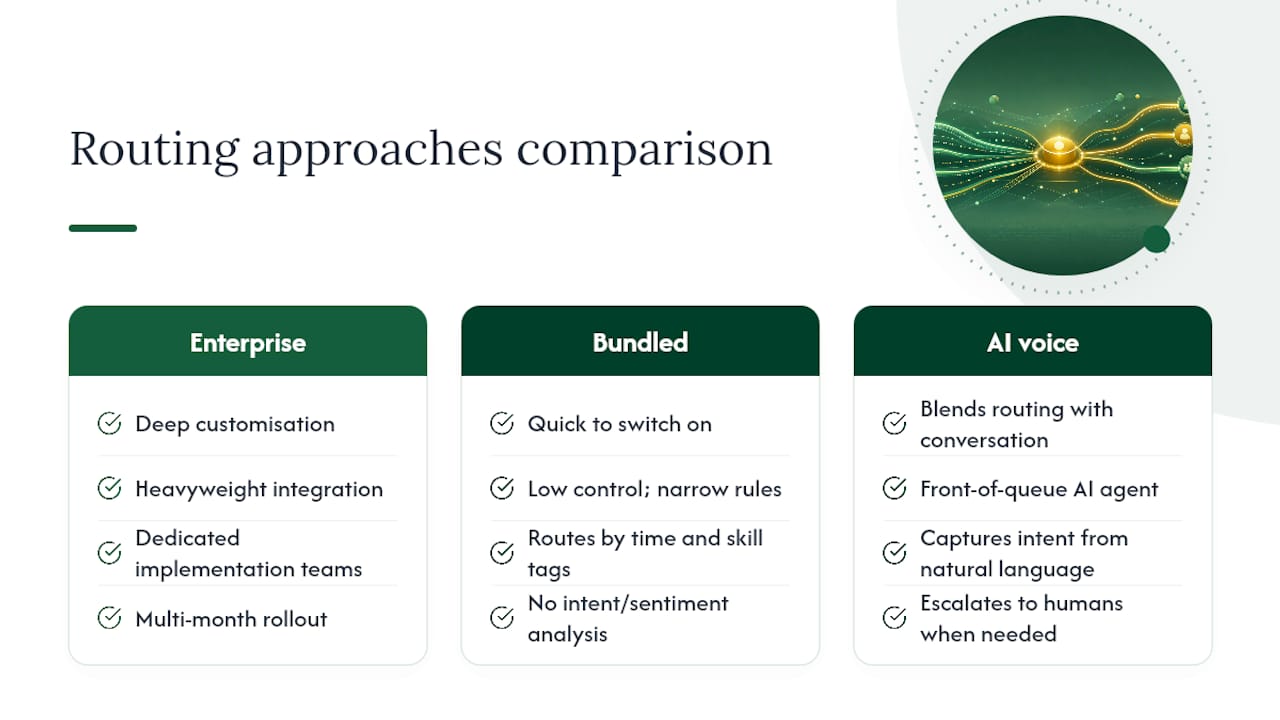
Enterprise contact centre platforms offer deep customisation and heavyweight integration, but they usually need dedicated implementation teams and a multi-month rollout. They suit large operations with complex, multi-tier skill routing across hundreds of agents.
Entry-level or bundled routing tools attached to a broader help desk or CRM suite are quick to switch on but often route on narrow rules, mostly time and skill tags, without deeper intent or sentiment analysis. They’re a reasonable fit for a business with simple, low-volume queues.
AI voice agent platforms, the category Wattle sits in, blend routing with the front-of-queue conversation itself. Instead of routing a call after an IVR menu, the AI agent has the conversation, captures intent directly from natural language, and only escalates to a human when the situation calls for it. This suits businesses that want fewer dropped calls and less IVR friction rather than a bigger routing engine bolted onto an existing switchboard.
None of these categories is universally correct. A business running a 200 seat enterprise support floor has different needs to a service business fielding appointment calls, and the honest answer is to match the platform to your call volume, complexity and existing tech stack rather than picking whatever ranks highest on a review site.
What goes wrong during intelligent routing rollouts?
Most failures trace back to three causes, and none of them are exotic.
Dirty or incomplete data is the biggest one. If CRM fields are inconsistent, duplicated, or simply out of date, an intent based router will confidently make the wrong call, and it’ll do it at scale. Audit data before go live, not after complaints start.
Skill tags that don’t reflect reality cause a similar failure from a different angle. An agent tagged for “technical support” three years ago who’s since moved teams still gets routed technical calls until someone manually corrects the record. Build a review cycle into your governance plan rather than treating skill tags as a set-and-forget field.
No fallback logic is a design gap that only shows up under load. What happens when the perfect skill match exists but that agent is on a call for another twenty minutes? Systems without an explicit fallback either force a long wait or default back to a random assignment, defeating the purpose of the whole exercise. Define these edge cases before launch, along with the wait time threshold that triggers a fallback.
A slower, more common pitfall is scope creep during the pilot. Teams start with one queue, then add a second and third before the first has proven out, which makes it impossible to tell which change actually moved the numbers. Keep pilots narrow, measure, then expand.
Where is intelligent call routing technology heading?
Predictive routing is the clearest trend, models that route based on projected outcome, not just current state. Instead of matching a caller to the nearest available skill tag, predictive systems weigh historical resolution data to estimate which specific agent is statistically most likely to resolve this specific type of call fastest, even if that agent isn’t first in the queue.
Sentiment analysis is getting more granular too, moving from a simple positive or negative tag toward detecting escalation risk in real time, mid-conversation, not just at intake. That opens the door to routing changes that happen while a call is already underway, not only at the point of first contact.
Conversational AI is increasingly doing the routing work itself rather than sitting in front of it. Rather than an IVR asking a caller to press one for sales, an AI agent has an actual conversation, captures intent from natural language, and either resolves the query directly or hands off to the right person, no menu tree required. Platforms like AmmarAI’s conversational AI tools reflect this broader shift toward natural language interfaces replacing structured menus across customer contact channels.
Expect tighter integration between routing decisions and real-time workforce data too, systems that account for an agent’s fatigue level or recent call complexity, not just their raw availability, when deciding who takes the next call.
Buy, build or partner: a decision framework
An off-the-shelf platform is almost always the faster, lower-risk path. Most businesses don’t have a routing problem so unique that it justifies months of engineering time, and a platform vendor has already solved the integration and latency problems you’d otherwise be debugging from scratch.
Building in-house only makes sense when you have genuinely unique IP in your routing logic, or when your legacy systems are so specific that no vendor connector will ever cleanly reach them. That’s a narrow case, and it’s worth being honest about whether your situation actually meets it or whether it just feels that way from inside the organisation.
Whichever route you take, ask the same three questions: Can the routing logic be tested against our actual CRM data before we commit? What happens, precisely, when a routing rule fails or a fallback triggers? And who owns the audit trail if a routed call ends up in a dispute? Vendors and internal teams should both be able to answer all three without hedging.
— Christopher
Try intelligent call routing without the build
If you’ve read this far weighing a build against a buy, Wattle is the faster route to the same outcome: it handles the routing decision and the conversation in one system, so calls get resolved or escalated correctly without you standing up separate IVR, CRM sync and routing logic yourself. It answers calls, books appointments, takes payments and hands off to a person the moment a conversation needs one, across phone, web chat, WhatsApp and SMS, with every interaction landing in a single inbox.
A pilot typically runs against one queue, with appointment bookings or lead capture as common starting points, and businesses generally evaluate fit within weeks of live calls. You can explore the full feature set and start a trial on Wattle directly from the platform page.
Sources
For a deeper technical grounding, the Wikipedia entry on automatic call distributors covers the legacy routing strategies that intelligent systems build on. Salesforce’s guide to intelligent call routing explains the shift toward value-based, context-driven routing. GetVoIP’s implementation guide offers practical rollout and measurement advice drawn from real deployments.
- Intelligent call routing: benefits and how it works | GetVoIP
- Automatic call distributor — Wikipedia
- Intelligent Call Routing: Benefits & How It Works | Salesforce
FAQ
What is automated call routing?
Automated call routing directs an incoming call to an agent or department using preset rules, like time of day, caller menu selection or agent availability, without a person manually transferring the call.
What is call routing and how does it work?
Call routing works by capturing signals about the caller, their number, IVR selections, account history, and matching those signals against rules or AI models that decide which agent or resource should handle the call. Intelligent versions add real-time intent and sentiment analysis on top of those signals to improve the match.
How is intelligent call routing different from a standard IVR menu?
A standard IVR routes based on menu selections a caller manually makes. Intelligent call routing analyses spoken or typed intent, sentiment and CRM history automatically, often without the caller navigating a menu at all.
Can intelligent call routing work across chat and SMS, not just phone calls?
Yes. Modern platforms, including Wattle, apply the same routing and handoff logic across phone, web chat, WhatsApp and SMS, feeding every channel into one unified inbox.
How long does an intelligent call routing pilot typically take?
Most pilots run 30 to 60 days against a single queue, with success measured against first call resolution and transfer rate before the rollout expands to additional channels.