
“Thanks for calling [Business Name], this is [Name] — how can I help you today?” That six-second line, delivered by the third ring, works because it confirms the caller reached the right place, puts a human name to the voice, and hands control straight back with a question. Teams that don’t want to script it live can hand the job to an automated voice agent, which delivers the same structure on every call, every time.
TL;DR:
- Calls answered by automation or live staff should establish the company name, agent identity, and offer to help within six seconds to maintain engagement.
- Scripts should be consistent across agents and channels, with clear sequencing of key components, and stay within the recommended length to avoid caller frustration.
- IVR prompts must identify the business and options quickly, ideally under 15 seconds, with menus limited to six options that prioritize common tasks.
- Voicemail messages should provide a specific callback time or alternative contact, especially during extended closures or holidays, to reduce repeat calls and caller frustration.
- Automating high-volume or after-hours calls with AI voice agents like Wattle ensures consistent greetings, captures key details, and efficiently routes complex requests to humans.
WattleKeep Every Call MovingWattle answers calls, asks relevant questions, books appointments, and hands complex conversations to your team when human support matters.Explore Wattle
Table of Contents
- What makes a call greeting script actually work?
- Live answer, IVR, voicemail, and after-hours: how scripting differs
- The anatomy of a greeting that never fails
- Copy-ready scripts for every call scenario
- Structuring your menu and two flows to copy
- How to train your team to deliver it naturally
- Where automation fits and where it doesn’t
- What actually separates a good script from a wasted one
- Try the script, then let Wattle handle the volume
- Sources
- FAQ
What makes a call greeting script actually work?
A greeting is often the only impression a caller forms before they decide whether to stay on the line or hang up. Get the first ten words wrong and the rest of the call is spent recovering, not solving the caller’s problem.
The timing matters more than most scripts admit. A live, human greeting should run to 3 to 6 seconds, long enough to confirm the business and the person, short enough that it doesn’t feel like a wait. Recorded greetings have more room, but even they should stay under 25 seconds before the caller can act. Push past that and people start second-guessing whether they’ve dialled correctly, or worse, they hang up before the menu even finishes.
Consistency is the part teams underestimate. If one staff member answers with a warm, structured greeting and another mumbles “yep, speaking,” callers experience two different businesses depending on who picks up. That inconsistency shows up in call data as longer average handling times and higher transfer rates, because callers who aren’t greeted with the offer to help spend the first fifteen seconds explaining themselves before anyone actually listens.
Three things to prioritise when you write or audit a script:
- Speed of the essentials. Business name and offer to help need to land inside the first breath, not after a paragraph of pleasantries.
- Predictable structure. Every agent uses the same order of information, so callers know what to expect regardless of who answers.
- Measurable length. If a greeting runs long in practice, it tends to run long on many calls throughout the day.
Live answer, IVR, voicemail, and after-hours: how scripting differs
A phone greeting script isn’t one document. It’s four different jobs, and each one has different priorities depending on whether a human or a machine is doing the talking, and whether the caller is expecting an immediate answer or leaving a message.
Live answer is about warmth and speed. A person answering the phone should identify the company, give their own name, and ask what the caller needs, all inside that 3 to 6 seconds window. There’s no room for a company mission statement here. The formula that holds up across professional call scripts is company name before agent name, followed by an explicit invitation to state the reason for calling — not “how are you today,” which invites small talk the caller didn’t ask for.
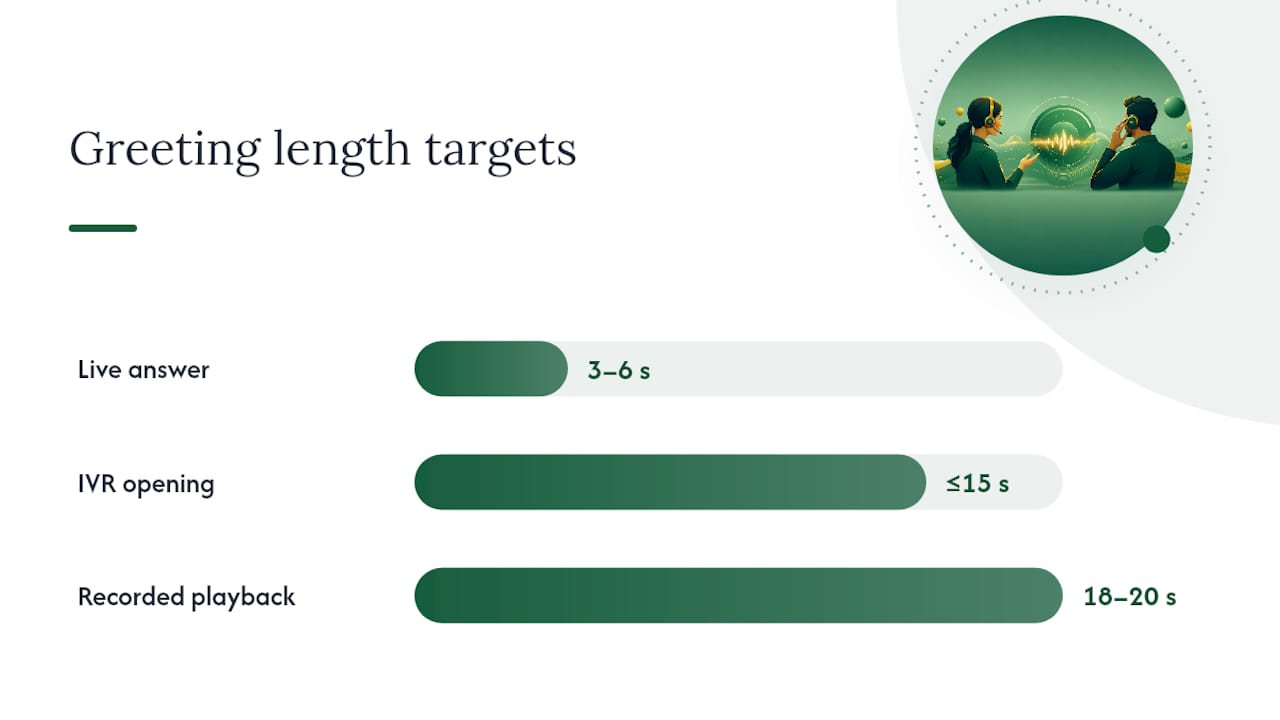
IVR and auto-attendant greetings work differently because nobody’s listening for warmth, they’re listening for options. The opening message needs to identify the business, welcome the caller, and acknowledge the menu quickly, all before the 15-second mark. Recorded scripts drift longer than they sound on paper. What reads as a tight 10-second script often plays back at 18 or 20 seconds once someone records it at a natural pace, so testing the actual recording for speed matters as much as writing it well.
Voicemail and after-hours scripts carry a different job entirely: managing expectations while the caller isn’t getting an answer at all. The script needs three things:
- A clear statement that the caller has reached the right place, even though nobody’s there.
- An honest callback window, because “we’ll get back to you” without a timeframe leaves people guessing.
- An alternative contact method or next step for anything urgent.
After-hours and holiday scripts perform better when they give a specific return date or time, or point to another way to get help, rather than a vague promise to call back “soon.” That specificity is what separates a voicemail greeting that reduces repeat calls from one that just annoys people into calling three more times that day.
The anatomy of a greeting that never fails
Every effective greeting, live or recorded, follows the same underlying skeleton. Strip away the personality and the branding, and you’re left with five components in a fixed order.
- Time-of-day greeting (optional) — “Good morning” or “Good afternoon” sets tone without costing time.
- Thank you (optional) — “Thanks for calling” acknowledges the effort of picking up the phone.
- Company name — non-negotiable, and it comes before anything else identifying.
- Your name — puts a person behind the business, even on a recorded line.
- Offer to help — the line that hands control to the caller.
That order isn’t arbitrary. Industry scripting guides consistently sequence it this way because callers process information in the order they hear it, and the company name is what confirms they’ve reached the right number before anything else registers.
Length targets by type, and why they matter:
Greeting type Target length Why it matters Live human answer 3 to 6 seconds Longer feels scripted and delays the caller’s actual question Recorded/IVR opening Under 15 to 25 seconds Callers disengage past 20 seconds without an actionable option Voicemail message Under 20 seconds Long outgoing messages push callers to hang up before the beepMenu design has its own set of rules, separate from the greeting itself. Keep top-level options to six or fewer, describe what the option does rather than which department it routes to (“to book an appointment, press 1” beats “for sales, press 1”), and push anything used by a small minority of callers into a nested sub-menu rather than cluttering the main list.
Delivery rules apply regardless of how good the script is on paper:
- Answer by the third ring wherever possible; delays before pickup set the tone before a word is spoken.
- Smile while speaking. It sounds trivial, but it measurably changes vocal tone, and callers can hear the difference.
- Cut internal jargon, department codes, or system names the caller has no reason to know.
- Never read the script so rigidly it sounds robotic. The words matter less than the pacing.
Pro Tip: Record one staff member reading the approved greeting out loud and share the clip with the whole team. Written scripts get interpreted five different ways; an audio reference gets everyone reading from the same pace and tone.
Copy-ready scripts for every call scenario
These are written to be used as-is or lightly edited with your business name and hours. Read each one aloud before locking it in. Anything that runs long on paper tends to run longer in practice, once natural pauses and a real voice are added.
Live answer templates
- Standard business line: “Thanks for calling [Business Name], this is [Name]. How can I help you today?”
- High-volume front desk: “[Business Name], this is [Name] speaking.” (Pause for response, then) “What can I do for you?”
- After a short hold: “Thanks for your patience, this is [Name] at [Business Name]. Sorry for the wait, how can I help?”
- Departmental line: “[Department Name] at [Business Name], this is [Name]. What can I help you with?”
- Solo operator or small trades business: “Hey, [Business Name], [Name] here. What’s going on?”
IVR opening prompts
A basic four-option menu for a single-location service business:
“Thanks for calling [Business Name]. To book an appointment, press 1. For an existing booking, press 2. To speak with our billing team, press 3. For all other enquiries, press 0.”
For a multi-location business, location needs to come before service type, or callers get routed to the wrong branch entirely:
“Thanks for calling [Business Name]. If you’re calling about our [Location A] branch, press 1. For [Location B], press 2. For [Location C], press 3. To speak with someone directly, press 0.”
Keep both under 15 seconds when spoken at normal pace, and test the actual recording, not just the script on the page.
Voicemail templates
Individual staff member, out of office: “You’ve reached [Name] at [Business Name]. I’m away from my desk right now, but leave your name, number, and a quick message and I’ll call you back within one business day.”
General business voicemail: “Thanks for calling [Business Name]. We’re currently unable to take your call. Please leave your name, number, and reason for calling, and we’ll get back to you within [timeframe]. For urgent enquiries, email us at [alternative contact].”
Specificity is what separates a voicemail script that actually reduces repeat calls from one that just frustrates people further, since naming a return timeframe or an alternative contact lowers caller frustration compared to a vague “we’ll be in touch.”
Hold and transfer scripts
Putting someone on hold without warning is one of the fastest ways to lose trust mid call. Best practice is to ask permission, give a reason, and estimate a short hold time, then offer a callback if that estimate is going to blow out.
- Requesting a hold: “Do you mind holding for about two minutes while I pull that up for you?”
- Returning from hold: “Thanks for holding, appreciate your patience. Here’s what I found…”
- If the hold runs long: “This is taking longer than expected, would you prefer I call you back in ten minutes once I’ve got the answer?”
- Warm transfer: “I’m going to pop you through to [Name] in [Department], who can help with that directly. One moment while I connect you.”
- Cold transfer (when warm isn’t possible): “I’ll transfer you now, if the call drops please call back and ask for [Department].”
After-hours and holiday scripts
“Thanks for calling [Business Name]. Our office is currently closed. Our regular hours are [days/times]. Leave a message and we’ll return your call by [specific time or day], or visit [website] for [self-service option].”
For extended closures like public holidays, name the exact return date rather than a generic “we’ll be back soon”:
“Thanks for calling [Business Name]. We’re closed for the [holiday name] period and will reopen on [specific date]. For anything urgent, email [contact], and we’ll respond as soon as we’re back.”
Structuring your menu and two flows to copy
Menu order isn’t guesswork. Prioritising the most common caller tasks first, capping the top-level list at six options, and using action-based labels cuts down on the number of callers who press the wrong button and end up transferred twice before reaching the right person.
A few rules make the difference between a menu that works and one that generates complaints:
- List the option most callers want first, not the one that’s organisationally convenient for you.
- Describe the action (“to reschedule an appointment”) rather than the internal team name (“for scheduling”).
- Push anything used by a small share of callers, like fax numbers or specific staff extensions, into a nested sub-menu rather than the main list.
- Include a “press 0 for operator” fallback for callers whose need doesn’t fit any listed option, rather than forcing them to guess.
- Reserve warm transfers for calls that need a specific person; use blind or automated routing for straightforward requests like “opening hours.”
Sample flow: small service business (single location)
“Thanks for calling [Business Name]. To book or reschedule an appointment, press 1. To speak with someone about an existing job, press 2. For billing, press 3. For anything else, press 0 and we’ll connect you with our team.”
Sample flow: multi-location business
“Thanks for calling [Business Name]. If you’re calling about our [Suburb A] location, press 1. For [Suburb B], press 2. For [Suburb C], press 3. To speak with our head office directly, press 0.”
Both flows work because the caller makes one decision, not three, before reaching a human or getting the information they called for.
How to train your team to deliver it naturally
A script on a laminated card next to the phone doesn’t change behaviour. Training does, and it doesn’t need to take longer than a single team meeting to get the basics right.
The sequence that works:
- Read-through. Everyone reads the approved script aloud, individually, so the wording feels natural in their own voice rather than someone else’s.
- Role-play. Pair staff up and run mock calls, swapping who answers and who calls in with a typical enquiry.
- Peer feedback. Have colleagues note anything that sounded scripted, rushed, or unclear, then adjust.
- Live monitoring. Spot-check real calls for the first week or two after rollout, not to catch people out, but to fix drift early.
Once the script is live, a handful of numbers tell you whether it’s actually working:
- Answer speed — are calls being picked up by the third ring consistently?
- Abandonment rate — are callers hanging up before reaching a person?
- Transfer rate — how many calls need to be moved because the first person couldn’t help?
- First-contact resolution — what share of callers get their answer without a callback or transfer?
Feedback should flow both ways. Ask staff which parts of the script feel awkward to say out loud, because a line that reads fine on paper sometimes trips people up in practice, and ask a sample of callers whether their call felt efficient. Both inputs matter more than assuming the script is fine because nobody’s complained.
Pro Tip: Record one exemplar greeting per shift type, morning, afternoon, and after-hours, so every new hire has an actual audio reference rather than a written script to interpret from scratch. A short model recording from a manager measurably speeds up consistent delivery across a team.
Where automation fits and where it doesn’t
Scripts solve consistency for humans. Automation solves it for volume. Automation solutions handle both by picking up calls with an AI voice agent, following the same greeting structure every time, and asking the qualifying questions that would otherwise fall to whoever’s free at the front desk.
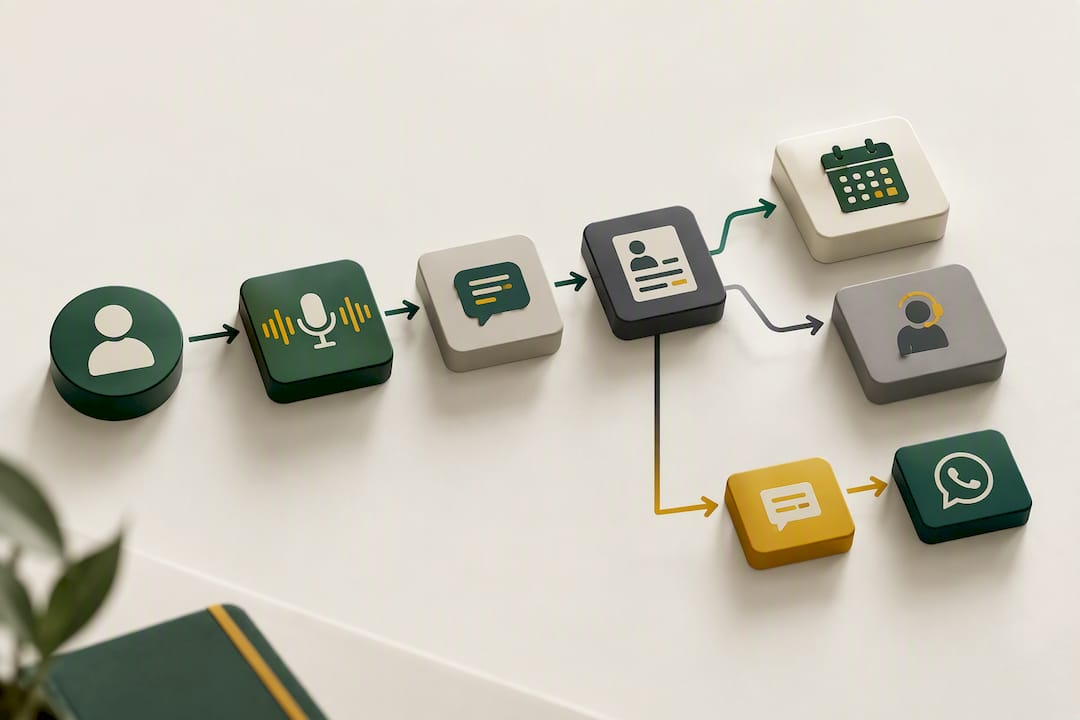
The practical case for automation shows up in specific situations: lines that ring constantly during peak hours, businesses that need to capture bookings outside office hours, or teams that keep losing calls to voicemail because everyone’s already on another line. Call-flow builders let a business define exactly what the agent asks and captures, then hand off to a human the moment a call turns sensitive or complex, either as a live notification or a full warm transfer.
A common setup: the AI agent opens the call, confirms the reason for calling, captures a name and preferred time, and books directly into a connected calendar. If the caller needs something outside that scope, a refund dispute, a complaint, anything requiring judgment, the agent hands off to a person rather than guessing. Follow-up after the call, whether that’s a booking confirmation or a missed-call text, can run over SMS or WhatsApp, and WhatsApp’s richer messaging with SMS as a reliable fallback covers both time-sensitive and detailed follow-ups without extra tools.
What actually separates a good script from a wasted one
Most advice on phone greetings focuses on tone, warmth, sounding friendly. That’s not wrong, but it’s not where most businesses lose callers. They lose them on length and structure: greetings that ramble past the point where callers are still listening, or menus built around internal department names instead of what the caller actually wants to do.
The conventional wisdom oversells personality and undersells timing. A friendly greeting that runs 12 seconds loses more callers than a flat one that runs five, because impatience beats charm every time someone’s holding a phone to their ear waiting to be helped. Get the anatomy right first, company name, your name, offer to help, inside a few seconds, and warmth becomes something you layer on top, not something you’re relying on to save a script that’s already too long.
Where I’d push back hardest is on the idea that every call needs a human touch to feel personal. A well-built automated opening that gets straight to the point, captures the right details, and hands off cleanly when it hits its limits often serves callers better than an overstretched human who’s rushing between five other calls. The goal isn’t choosing humans or automation. It’s matching the right one to the call in front of you, and building a script that works whichever one picks up.
— Christopher
Try the script, then let Wattle handle the volume
Wattle is the automated front desk for calls that come in faster than your team can consistently greet them, answering with the same structured opening every time, capturing booking details, and handing sensitive calls straight to a person.
Where a written script needs a human to remember it call after call, an AI voice agent applies it identically whether it’s the first call of the day or the fiftieth. AI voice agents follow the anatomy you’d train into any new starter, greet, confirm, offer help, and route through a call-flow builder that captures names, times, and booking details before handing complex or sensitive requests to a real person through a warm transfer. Every call, chat, and message can land in one inbox, helping reduce the chance of missed contacts across phone, web, WhatsApp, and SMS.
Start by locking in the script templates above for your live team. Once you’ve got a baseline for how your busiest line performs, check the Starter, Pro, and Max plans to see where automation could pick up the calls your team can’t answer fast enough, and get a feel for what an AI voice agent sounds like on your own number.
Sources
The timing and structural claims in this piece draw on a small set of practical scripting guides rather than academic research, because phone greeting standards are set by industry practice, not clinical studies.
- Phone Greeting Scripts: 3
- How to Write a Professional Business Phone Greeting (With Script Examples)
- 100 phone greeting script examples
- Call Center Scripts: Examples and Templates for Every Scenario
FAQ
What is a good script for a voicemail greeting?
A solid voicemail script confirms the business name, states clearly that no one can take the call right now, and gives a specific callback window rather than a vague promise. Something like: “You’ve reached [Business Name]. We can’t take your call right now, but leave your name, number, and reason for calling, and we’ll get back to you within one business day.”
How do I greet someone on a call?
Open with the business name, give your own name, and ask directly how you can help, all within about 3 to 6 seconds. Skip small talk like “how are you” at the start; it delays the caller getting to their actual reason for calling.
What is a good voicemail greeting for after-hours?
Name the business, state your regular hours, and give an exact return date or alternative contact rather than “we’ll call you back soon.” For extended closures like holidays, naming the specific reopening date reduces repeat calls and caller frustration compared to a generic message.
What is the best opening spiel for a call centre?
The most reliable formula is company name, agent name, then an offer to help, kept under six seconds for live calls. For teams handling high call volumes where consistency slips, an AI voice agent like Wattle can apply that exact structure to every call without variation.
How long should a business phone greeting be?
A live human greeting should run 3 to 6 seconds, while a recorded IVR or voicemail greeting should stay under 15 to 25 seconds before the caller reaches an actionable option. Anything longer risks callers disengaging or hanging up before they get the information they need.