
A unified customer history is a single, chronological record that links everything a customer has done across every channel, calls, chats, purchases, bookings and support cases, into one profile every team can see. Done properly, it means a salesperson, a support agent and a marketing platform all work from the same facts instead of three different guesses. Get this right, and repeat calls stop starting with “can you explain your issue again?”
TL;DR:
- True unification requires structured, comprehensive data covering identifiers, consent, communication history, transactions, and support, not just message aggregation.
- Building a reliable unified customer history depends on prioritizing high-value journeys, normalizing data, and implementing reversible identity resolution rules.
- Effective identity matching uses deterministic identifiers for accuracy and probabilistic methods to infer matches, with raw evidence kept for reversibility and review.
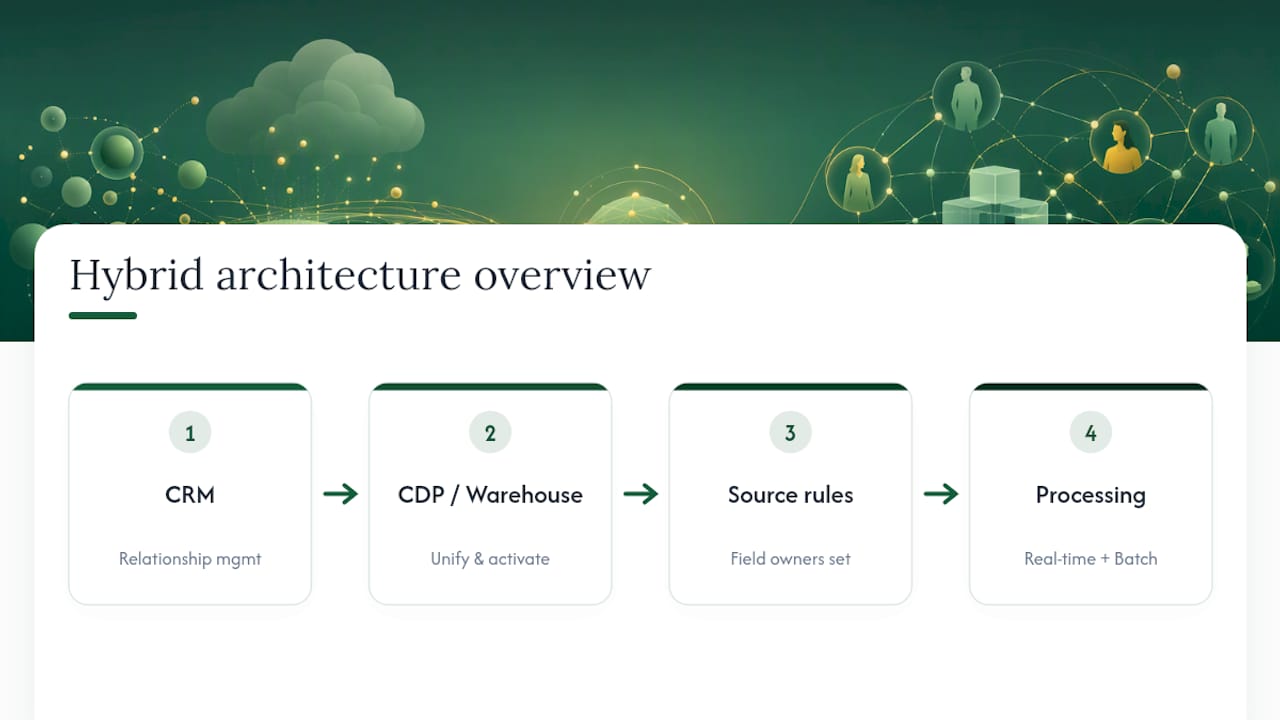
- The right architecture varies based on existing systems and interaction complexity, with hybrid setups combining CRM, CDP, and batch or real-time processing.
- Proper governance, consent management, audit logs, and compliance controls are essential to maintaining trust and avoiding legal or reputational risks.
Wattleheywattle.comBring Every Customer Conversation TogetherWattle connects calls, SMS, website chats, invoices, quotes, and payment requests in one customer thread for clearer context.See how Wattle works
Table of Contents
- What counts as a unified customer history?
- Where the data actually comes from
- How to build a unified customer history step by step
- Identity resolution: matching customers without making a mess
- Choosing the right architecture
- Governance, privacy and consent controls that hold up
- Measuring whether it’s actually working
- A vendor-class example: how this looks in an operational tool
- Where these projects go wrong
- Where Wattle fits in your unified-history plan
- Sources
- FAQ
What counts as a unified customer history?
A unified customer profile is more than a shared inbox. It’s a structured record that stitches together everything relevant to one customer and each piece earns its place by solving a specific problem.
Here’s what a genuinely useful history captures, and why:
- Stable identifiers (email, phone, loyalty ID) so records match reliably instead of by guesswork.
- Consent status, recorded at the point of capture, so marketing and outreach stay compliant.
- Calls, recordings and transcripts, which cut resolution time because the next agent already knows what was said.
- Chats and SMS threads, kept in sequence so context survives a channel switch.
- Purchases, bookings and invoices, the commercial backbone that explains lifetime value.
- Support outcomes and staff notes, which stop the same problem being re-diagnosed twice.
- Workflow events (a quote sent, a callback scheduled) that show what’s still open.
- An audit trail of every merge, correction and update, essential when a customer disputes a charge or a record.
The difference between aggregation and true unification comes down to structure. Piling messages into one inbox is aggregation. A single customer view exists only when those messages resolve to one shared record and one timeline, not a folder of loosely related conversations.
Where the data actually comes from
Most businesses already hold the raw material for a unified history. It’s just scattered across systems that were never built to talk to each other.
The usual source list looks like this:
- CRM — contact records, deal stages, ownership history.
- Telephony and call platforms — call logs, recordings, transcripts.
- Website analytics — session behaviour, form fills, page paths.
- CDP or composable data layer — where identity resolution and activation happen.
- Point-of-sale systems — in-person transactions and returns.
- Loyalty and rewards platforms — points, tiers, redemption history
- Accounting software — invoices, payment status, credit notes.
- Spreadsheets — the unglamorous but common home of manual bookings and notes.
Each source needs an integration pattern to match. Direct APIs suit high-value, low-volume systems like a booking calendar. Event streams (webhooks) suit anything that needs near-real-time updates, a payment confirming, a call ending. Batch ETL suits large, slower-moving datasets like historical purchase records. Middleware connectors bridge older systems that were never built with APIs in mind.
Don’t try to connect everything at once. Pick the sources that touch your highest-value journey first, an inbound call that turns into a booking, for instance, and build outward from there.
How to build a unified customer history step by step
Building this in the right order matters more than building it fast. Skip a step and you’ll spend months untangling bad matches later.
- Audit your data sources and map the customer journeys that matter most. You can’t unify what you haven’t inventoried, and not every journey deserves equal priority.
- Define a canonical customer model. Decide what fields every profile must have, what “complete” looks like, and which system owns each field when there’s a conflict. Microsoft’s guidance on data unification treats this modelling step as the foundation everything else sits on.
- Normalise fields and timestamps, and capture consent flags at the point of ingestion. A phone number stored three different ways across three systems is not one identifier, it’s three unmatched ones. Tag every record with its source system so you can trace where it came from.
- Implement identity resolution and survivorship rules, and make every merge reversible. Never delete the raw match evidence, only reference it.
- Materialise the unified profile and event timeline into the tools your team actually uses, the CRM, the unified inbox, the automation platform, not a dashboard nobody opens.
- Pilot on one high-value journey, measure the result, then scale. Trying to unify every touchpoint in one go is how these projects stall for a year.
Pro Tip: Run your pilot on the journey with the highest repeat-contact rate first. If a unified history fixes that one, the business case for expanding it writes itself.
Identity resolution: matching customers without making a mess
Identity resolution is the mechanism that decides whether two records describe the same person, and getting it wrong is the fastest way to lose trust in the whole system.
There are two broad approaches:
- Deterministic matching ties records together using exact identifiers, an email address, a phone number, a loyalty number. It’s simple and defensible but misses records that don’t share a common field.
- Probabilistic matching uses behavioural and device signals to infer a likely match when no exact identifier exists. It catches more, but needs a confidence threshold and human review to avoid false merges.
Most identity resolution engines use a connected-components or graph-based approach, clustering records that share links transitively and producing a single golden record through configurable survivorship rules that decide which value wins when two sources disagree.
The safeguard that matters most is reversibility. Keep the raw, pre-merge values on file, not just the merged output, so a wrong match can be undone without losing data. Set a confidence threshold below which matches route to a human for review rather than merging automatically.

Choosing the right architecture
There’s no single right platform, only the right platform for how your interactions actually flow.
If most customer interactions already converge in one CRM, and you don’t need to resolve anonymous website visitors into known contacts, a CRM alone may genuinely be enough. Where you’re dealing with many source systems, frequent anonymous-to-known identity transitions, or the need to activate data across multiple channels in real time, a CDP or a composable data layer earns its complexity.
Forrester’s research on identity resolution platforms points to a consistent set of selection criteria: latency, the destinations you need to activate into, lineage tracking, access controls, and overall cost against complexity.
In practice, most mature setups end up hybrid: a CRM for relationship management, a CDP or warehouse for unification and activation, and clear rules about which system is the source of truth for which field. Real-time matters for anything customer-facing, like a live call; batch processing is perfectly fine for reporting and analytics that run overnight.
Governance, privacy and consent controls that hold up
A unified history is only as trustworthy as its access controls. Build these in from day one, not as a retrofit after a complaint.
The practical controls worth having:
- Field-level access permissions, so sensitive fields aren’t visible to every team.
- Consent flags attached to the record, not stored separately in a spreadsheet.
- Opt-out handling that propagates instantly across every channel.
- Audit logs covering every merge, correction and access event.
- Retention windows that expire data on schedule rather than by accident.
- Correction workflows so a customer can fix a wrong detail without a support ticket.
For Australian businesses, Australian Privacy Principle 7 governs using personal information for direct marketing. It generally requires a reasonable expectation that the information would be used this way, a working opt-out mechanism, and, in some cases, disclosure of where the data came from. The practical takeaway: always verify that any purchased third-party data used in your unified history was collected with proper consent.
Measuring whether it’s actually working
Split your metrics into two categories, technical health and business outcomes, and track them separately, because a technically clean profile doesn’t automatically move revenue.
On the data-quality side, watch:
- Duplicate rate and false-merge/false-split rate, the core signals of matching accuracy.
- Profile completeness, how many required fields are actually populated.
- Processing latency, how long it takes an event to reach the unified profile.
On the business side:
- First-contact resolution rate
- Conversion from inbound contact
- Retention
- Campaign suppression accuracy (are opted-out customers actually excluded?)
Where to start: HubSpot’s guidance on building a single customer view recommends proving the model on one high-value journey before rolling it out enterprise-wide, then using that pilot’s metrics as your baseline targets for the next phase.
Set up alerting on the data-quality metrics specifically. A spike in the false-merge rate is usually the first sign something upstream broke.
A vendor-class example: how this looks in an operational tool
Concepts are easier to trust once you see them running. Wattle’s unified inbox groups calls, SMS, web chats, invoices and payment requests into one customer thread, which is the unified-history model in its simplest operational form.
What makes it more than aggregation:
- Call transcripts and captured flow data attach directly to the customer profile, not a separate call log.
- Duplicate contacts get flagged for guided merging, with both phone numbers retained rather than one discarded.
- Protected actions, bookings, cancellations, payments, require confirmation or a six-digit verification step before they execute.
- Sensitive or ambiguous conversations escalate to a human through warm or blind transfer, with the AI taking a message if nobody’s available.
- Integrations with Google Calendar, Xero and Stripe let the unified profile trigger real actions, a booking, an invoice, a payment link, instead of sitting as a static record.
Where these projects go wrong
The most common failure is treating aggregation as unification, congratulating yourself on one inbox while three systems still disagree about who the customer is. The second is scaling before the matching rules are proven; a bad identity rule replicated across ten thousand records is worse than no rule at all.
Watch for a rising false-merge rate during your pilot; that’s your earliest warning sign. Governance gaps, no audit trail, no consent flag, show up as compliance risk months later, not on day one.
Sequence it: stabilise identifiers on one journey, automate that journey, then expand.
Where Wattle fits in your unified-history plan
If you’re weighing up building this from scratch against adopting a tool that already handles the messy part, capturing voice and messaging events into a structured timeline, Some unified communication platforms are built around exactly that job. Calls, SMS and web chats can land in one customer thread with transcripts, summaries and captured details attached automatically, so you’re not manually stitching phone logs to CRM records months after the fact.
Guardrails stay switched on throughout: protected actions like bookings and payments need explicit confirmation, and anything sensitive hands straight to a staff member. Connected to Google Calendar, Xero, Stripe and your existing workflow tools, that unified timeline stops being a record you check and starts being one that acts. If you’re ready to see what that looks like against your own call volume, view Wattle’s pricing plans or explore the platform at Heywattle to book a walkthrough.
Sources
- What Is a Unified Customer Profile? | Salesforce
- Data unification | Microsoft Dynamics 365 Customer Insights
- Single customer view guidance | Shopify
- OAIC — APP guidelines: chapter 7 (direct marketing)
FAQ
What does “unified customer view” mean?
A unified customer view is a single record that pulls together every interaction a customer has had across channels, calls, chats, purchases and support cases, so any team member sees the same context. It’s the same concept as a unified customer profile or Customer 360.
What is an ICP example?
An ICP, or ideal customer profile, describes the type of customer that gets the most value from what you sell, typically defined by firmographic traits like industry, size and budget. It’s a planning tool for who to target, distinct from a unified customer history, which tracks what an actual customer has already done.
What is unified customer data?
Unified customer data is information from separate systems, CRM, telephony, website, support, that has been matched to the correct person and merged into one consistent record. It differs from raw aggregated data because duplicates are resolved and every field traces back to its source.
What are examples of good customer experience?
Good customer experience usually means a customer isn’t asked to repeat information they’ve already given, whether that’s on a call, in a chat, or during a follow-up email. Platforms like Wattle aim for this by carrying call transcripts and captured details forward into every later interaction, so context survives the channel switch.