
Yes, an AI front desk can answer calls, qualify leads and book appointments for real estate legal enquiries, and do it well. But that verdict comes with one non‑negotiable condition: the AI qualifies and schedules, lawyers retain every ounce of legal judgement, and the whole setup must satisfy OAIC privacy guidance and legal‑profession supervision rules before a single call gets recorded.
TL;DR:
- An AI front desk must qualify and schedule inquiries while legal judgment remains with qualified lawyers to ensure compliance with privacy and professional standards.
- It captures key details such as party role, property address, urgency, and communication preferences, using scripted flows for consistency in sensitive transactions.
- Firms should conduct thorough privacy assessments, obtain explicit caller consent, and establish clear accountability roles before deploying AI systems publicly.
- Proper vendor evaluation involves testing integrations, security measures, knowledge sources, and support capabilities to ensure long-term reliability and compliance.
- A phased implementation, including governance, configuration, testing, soft launch, and ongoing review, minimizes risks and ensures AI assists without replacing human oversight.
WattleA More Capable Legal Front DeskWattle answers calls and chats, captures enquiry details, books appointments, and hands sensitive conversations to your team.Explore Wattle
Table of Contents
- What an AI for law firms real estate front desk actually does
- What real estate teams actually gain from automation
- Privacy, professional conduct and compliance checklist
- Vendor evaluation checklist for procurement and pilot
- A step‑by‑step rollout plan that won’t blow up your compliance position
- Who owns this once it’s live
- Handling the enquiries AI genuinely can’t resolve
- Customising the AI for property law language and clients
- The ethical line firms can’t blur
- What changes for clients and for the firm day to day
- Author perspective: what actually breaks in AI front desk pilots
- Getting started with a compliant Wattle front desk
- Sources
- FAQ
What an AI for law firms real estate front desk actually does
Think of it as reception that never clocks off. A properly configured AI front desk pulls enquiries from phone, web chat, WhatsApp and SMS into one inbox, so messages about contract exchanges and other time-sensitive matters don’t sit unread for extended periods.
For real estate matters specifically, the value sits in what gets captured, not just that something gets captured:
- Party role (buyer, seller, tenant, landlord, or a broker calling on someone’s behalf)
- Property address and matter type (purchase, lease, subdivision, dispute)
- Urgency flags, particularly for settlement deadlines or finance conditions
- Preferred callback window and communication channel
Scripted call flows suit intake because they’re deterministic. The same questions get asked in the same order every time, which matters when a regulator later asks how a lead was qualified. Conversational mode has its place for general enquiries, but for anything touching a live transaction, scripted flows give you consistency you can defend. Calendar integrations and payment links then turn a qualified enquiry into a booked consult, sometimes with a deposit collected before the lawyer’s day even starts.
What real estate teams actually gain from automation
The most immediate change firms report is fewer enquiries falling through the cracks. A call that goes to voicemail on a Friday afternoon rarely converts. One that gets answered, qualified and booked converts far more often, simply because the momentum isn’t lost.
Automated confirmations and reminders cut the admin load that usually falls to a paralegal or receptionist, freeing that time for higher value work. After‑hours capture matters more in real estate than most practice areas, because settlement dates and cooling‑off periods don’t wait for business hours.
- Faster response time on new enquiries, especially outside 9 to 5
- Lower per‑enquiry administrative cost
- Consistent lead qualification regardless of who’s rostered on
- Reduced no‑show rates through automated reminders
Automation isn’t the right call everywhere. A boutique practice handling three or four bespoke matters a month, where every enquiry needs immediate senior partner triage, may find an AI layer adds friction rather than removing it.
Pro Tip: Run a shadow period where the AI qualifies calls but a staff member still reviews every transcript before the first booking goes live. This approach surfaces edge cases quickly, without risk.
Privacy, professional conduct and compliance checklist
Before any of this goes live, get the compliance foundations right. Recordings, transcripts and AI‑generated inferences all count as personal information under Australian privacy law, and collecting anything sensitive generally demands informed, current, specific consent, not a passive notice buried in your terms.
Silence after a privacy notice does not, by itself, establish consent. The OAIC’s guidance on commercially available AI products makes clear that paying for a tool doesn’t automatically make confidential handling acceptable.
Work through this sequence before go‑live:
- Map data flows. Know exactly what the AI records, transcribes, and stores, and for how long.
- Build explicit consent into the call opening. Tell callers recording is happening and why, then give them a real alternative if they decline.
- Confirm supervision structures. Legal regulators expect AI to stay assistive. The Statement on the use of artificial intelligence in Australian legal practice is explicit that lawyers remain accountable and must supervise every output.
- Vet the vendor properly. Check encryption standards, tenancy model (shared or isolated), audit log depth, and where training data came from, per OAIC guidance on training generative AI models.
- Apply least privilege. The front desk needs calendar access, not blanket access to client files or trust accounting.
APP 3 obligations extend to inference too. If the AI infers something about a caller’s circumstances (financial stress, urgency, dispute risk) that inference is personal information the moment it’s generated, whether or not it’s ever written down.
Vendor evaluation checklist for procurement and pilot
Shortlisting an AI front desk vendor is easier with a fixed set of questions, asked the same way of every candidate. Test calls matter more than sales decks here: book a live demo call and actually try to break it.
- Integrations: Does it connect to your calendar and invoicing or practice management system, or only offer a workaround?
- Security and privacy: What’s the encryption standard, is your data isolated from other tenants, and where does audit logging sit?
- Human handoff: Can it do a warm transfer (staff accepts before the call connects), a blind transfer, or just take a message?
- Knowledge grounding: If it uses retrieval‑augmented generation, can you inspect which source passage it pulled an answer from?
- Portability: If you switch vendors later, can you keep your existing phone number?
- Onboarding and support: What’s the realistic setup timeline, and what SLA backs ongoing support?
Guides on evaluating an AI feature beyond the demo are worth reading before you sign anything, because a slick five‑minute demo rarely exposes what happens on call forty, when a caller goes off script.
A step‑by‑step rollout plan that won’t blow up your compliance position
Rushing this is the single most common mistake firms make. A staged rollout catches problems while the stakes are still low.
- Phase 0, governance. Run a privacy impact assessment before any live caller data touches the system. Decide your recording policy, retention period, and who can access transcripts.
- Phase 1, configuration. Build your call flows, connect the calendar and payment actions, and switch on verification for anything that writes data or moves money.
- Phase 2, internal testing. Staff run controlled test calls, checking that consent language, fallback scripts, and handoff triggers all fire correctly.
- Phase 3, soft launch. Go live on limited hours or a single channel first. Watch no‑match rates and handoff logs daily.
- Phase 4, iterate. Expand hours and channels once the numbers hold up, and lock in a recurring audit schedule for retention and deletion compliance.
Pro Tip: Treat Phase 3 as a short soft launch period, not a permanent state. A prolonged soft launch without a decision to scale usually means the key performance indicators aren’t being actively reviewed.
Realistically, a mid‑sized real estate practice can move from Phase 0 to a stable soft launch within a few weeks, assuming the privacy impact assessment doesn’t surface issues requiring external legal sign‑off.
Who owns this once it’s live
Accountability has to sit with named people, not “the system.” Split it across four roles: the practice principal owns overall risk, a privacy lead owns APP compliance and consent records, a supervising solicitor reviews AI outputs before they touch client advice, and an operations lead owns the day‑to‑day monitoring.
- Train staff to recognise where AI’s limits sit, and when a call must escalate immediately
- Set prompt and template governance so nobody quietly edits agent instructions without review
- Track no‑match rates, handoff success, and who’s accessed recordings, on a weekly cadence
- Keep consent logs and policy documents retained long enough to answer a regulator’s query years later
None of this is glamorous work, but it’s the difference between an AI front desk that holds up under scrutiny and one that becomes a liability the first time a client complains.
Handling the enquiries AI genuinely can’t resolve
Real estate intake throws up questions no script anticipates. A caller mid‑settlement whose finance just fell through, a tenant facing an eviction they don’t understand, a seller asking whether a clause in an unseen contract is enforceable. These aren’t edge cases you can train away. They’re the reason human handoff exists.
The fix isn’t smarter AI, it’s better fallback design. Build explicit triggers into the call flow: if a caller mentions litigation, a dispute already in progress, or asks anything resembling “is this legal,” the AI should stop qualifying and escalate immediately, either through a warm transfer where staff accept the call live, or a blind transfer straight to a rostered solicitor. If nobody’s available, the AI takes a detailed message rather than guessing at an answer.
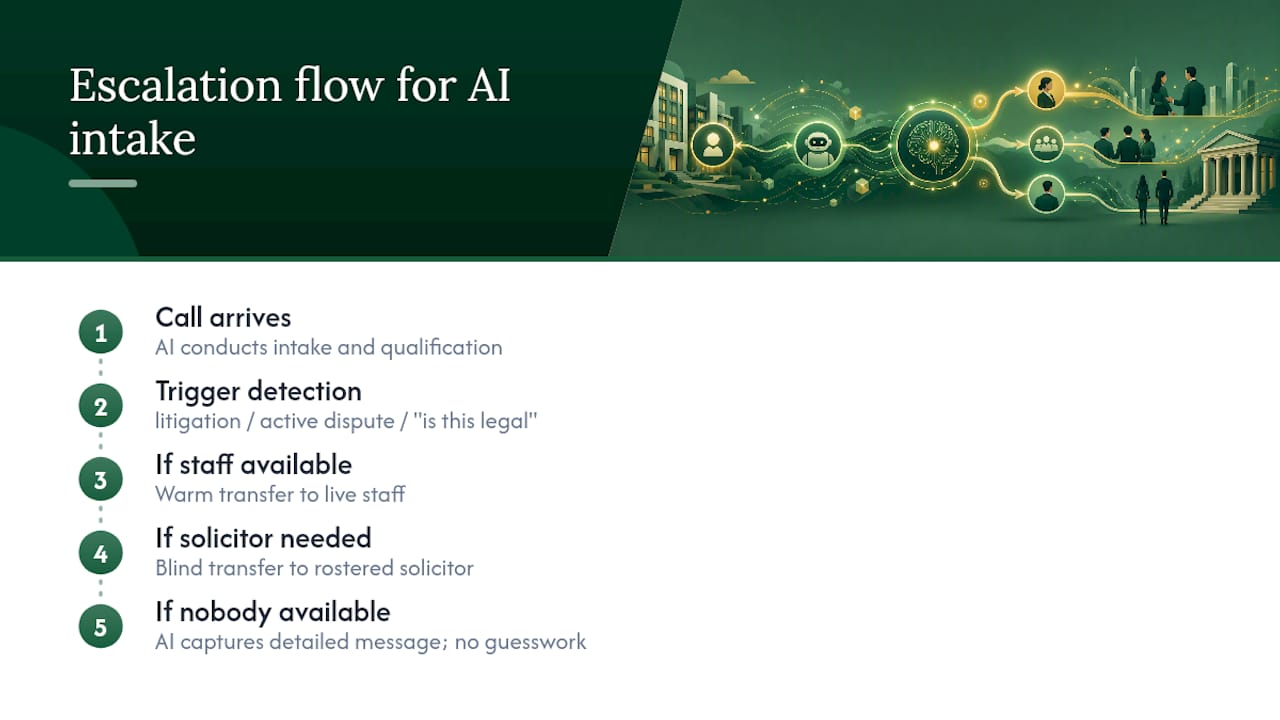
The riskiest failure mode isn’t the AI saying “I don’t know.” It’s the AI sounding confident about something outside its scope. A caller asking about cooling‑off periods in their state, easement rights, or whether a special condition is standard, needs to hear “let me get a lawyer to call you back,” not an improvised answer that sounds plausible.
Firms that get this right build a short list of trigger phrases and topics that force immediate handoff, then test them relentlessly during the pilot phase. Firms that get it wrong assume their AI vendor has already thought of every scenario. No vendor has. Real estate transactions involve too many jurisdiction‑specific quirks, too many contract variations, and too much money on the line for a generic fallback list to cover everything on day one. Expect to keep refining the escalation triggers for months after launch, based on what actually comes through the phone.
Customising the AI for property law language and clients
Generic AI voice agents stumble on real estate terminology fast. “Cooling‑off period,” “vendor’s statement,” “encumbrance,” “easement,” “settlement adjustment” are all words a caller expects the person answering the phone to understand without explanation. An AI front desk that asks a caller to clarify basic property terms erodes trust before the call even reaches a lawyer.
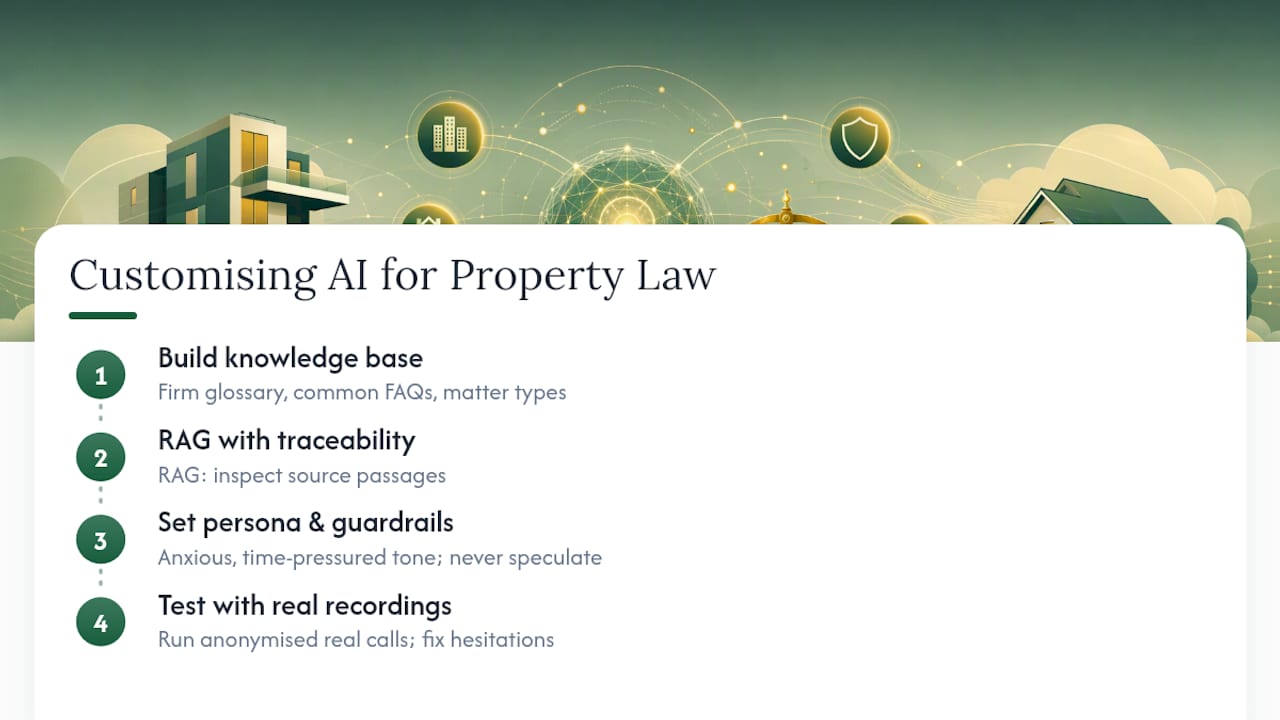
Customisation starts with the knowledge base, not the voice. Feeding the agent your firm’s own glossary, common client questions, and typical matter types (residential purchase, commercial lease, off‑the‑plan contracts, strata disputes) lets it recognise context instead of treating every call as a blank slate. A knowledge base built on retrieval‑augmented generation, where you can inspect exactly which source passage informed an answer, matters here, because you need to know why the AI said what it said if a client ever pushes back.
Persona matters too. A real estate intake line shouldn’t sound like a general customer service bot. Instructions, greeting, and tone should reflect that callers are often anxious, mid‑transaction, and time‑pressured. Configuring guardrails so the AI never speculates about legal outcomes, only ever confirms facts and books time with a lawyer, keeps the tone appropriately measured.
Test the customisation with real call recordings, not scripted demos. Run former client enquiries (anonymised) through the flow before launch, and see where the agent hesitates, mishears terminology, or routes incorrectly. That testing phase catches more problems than any amount of configuration reading ever will.
The ethical line firms can’t blur
The core ethical risk in AI legal intake isn’t data breaches, though those matter. It’s the blurred line between qualifying a lead and giving legal advice. A caller who hears an AI ask detailed questions about their contract terms can walk away believing they’ve received guidance, even when the AI was only capturing information for a lawyer to review later.
Firms need to be explicit, out loud, that the AI is not a lawyer and cannot give legal advice. That disclosure belongs in the greeting, not buried in a website footer. The Law Society’s guide to AI in legal practice is blunt about this: generative AI can hallucinate, and firms remain responsible for verifying every output before it influences a client’s decision or a lawyer’s billing.
There’s also an equity dimension. Not every client is comfortable talking to an AI, particularly older clients or those less confident with technology, and a real estate transaction is often the largest financial decision someone makes. Offering an immediate opt‑out to a human isn’t just good practice, it’s close to mandatory for maintaining trust with clients navigating what’s frequently a stressful process.
What changes for clients and for the firm day to day
Clients notice the difference within the first phone call. Instead of leaving a voicemail and waiting, they get answered, asked relevant questions, and booked into a time slot, often within minutes rather than days. For a seller anxious about a settlement date, that responsiveness alone changes how they perceive the firm before they’ve met a single lawyer.
Internally, the shift is less about workload disappearing and more about where it moves. Reception staff and paralegals spend less time on repetitive intake calls and more time on matter progression, follow‑ups, and the parts of a transaction that genuinely need a human. Lawyers get qualified leads with property details, urgency flags, and matter type already captured, rather than starting each consult from zero.
The workflow risk sits in over‑reliance. A firm that treats the AI front desk as a substitute for reviewing intake quality, rather than a tool that still needs oversight, will eventually miss something a human would have caught. The firms getting the best results treat the AI as the first filter, not the final check, and keep a person reviewing transcripts and outcomes on a regular schedule, not just when something goes wrong.
Author perspective: what actually breaks in AI front desk pilots
Most pilots fail on governance, not technology. Firms configure a slick call flow, skip the privacy impact assessment, and only discover the consent gap when a client complains. Wattle handles the technical side well, answering calls, booking appointments, taking payments, and handing off anything sensitive to a real person, with integrations into Google Calendar, Cal.com, Xero and QuickBooks Online, plus verification steps for protected actions. But no vendor can do your compliance homework for you.
— Christopher
Getting started with a compliant Wattle front desk
This offering gives real estate practices exactly the building blocks this checklist demands: a unified inbox across phone, web, WhatsApp and SMS, verification steps for protected actions, warm and blind transfer options for genuine human handoff, and direct calendar and payment integrations that turn a qualified enquiry into a booked, paid consult.
Rather than building intake automation from scratch or stitching together separate tools for calls, chat and booking, this platform runs it from one workspace, with plans structured across several tiers to match a practice’s call volume and feature needs. Every plan keeps the same core controls: scripted flows for consistent qualification, RAG‑backed knowledge bases you can inspect, and audit trails for the calls that matter most.
If your firm is weighing up a pilot, the practical next step is checking current plans and pricing and booking a demo call to test how the AI handles a real estate enquiry, end to end, before committing to a rollout.
Sources
- Guidance on privacy and the use of commercially available AI products | OAIC
- Guidance on privacy and developing and training generative AI models | OAIC
- Statement on the use of artificial intelligence in Australian legal practice
- Guide to AI in legal practice | The Law Society
FAQ
Can AI legally handle client intake for a real estate law firm?
Yes, provided the firm applies proper consent notices, limits the AI to qualification and scheduling, and keeps a supervising solicitor accountable for any legal judgement, per the legal profession’s statement on AI use.
Does recording AI calls require client consent?
Yes. Recordings and transcripts count as personal information under Australian privacy law, and the OAIC’s guidance makes clear that a passive notice alone does not establish valid consent for sensitive information.
What happens when a caller’s question is too complex for the AI?
A well‑configured system detects trigger topics like litigation or contract disputes and escalates immediately through a warm or blind transfer to a lawyer, or takes a detailed message if nobody’s available.
How much does Wattle cost for a law firm setting up an AI front desk?
Wattle’s plans start at Starter for A$99 per month, with Pro and Max tiers available for higher call volumes and additional features; exact fees for extras like Australian mobile numbers are listed on the pricing page.
How long does a real estate AI front desk pilot typically take?
Most firms move from governance setup to a stable soft launch within six to eight weeks, assuming the privacy impact assessment doesn’t surface issues needing outside legal sign‑off.