
A valid WhatsApp opt in is an explicit, recorded agreement to receive messages from your business, and it must name your business clearly. Meta’s stated minimum stops there, but naming WhatsApp as the channel, describing message types, and giving an opt-out path is the safer standard most compliance teams should follow. Keep a timestamp, the source, and the exact wording used at the moment of consent, because that record is what protects your number if anyone ever asks you to prove it.
TL;DR:
- Businesses must record clear, specific consent that names the company, describes message types, and includes opt-out instructions, with proof stored alongside contact data.
- Formal opt-in collection points like checkout checkboxes, thank-you pages, and QR codes outperform informal methods such as in-message clicks, especially when paired with proper documentation.
- Proper records require capturing exact consent wording, timestamp, source, purpose, and opt-out status in a unified system; retaining this data is crucial for compliance and defensibility.
- Meta’s minimum policy is narrower than legal standards, so companies operating internationally should design consent flows to meet stricter regional privacy laws like GDPR and India’s data rules.
- Automating consent capture and proof, such as through platforms like Wattle, reduces manual errors and simplifies audits, ensuring that all contacts hold valid, documented opt-ins before messaging.
WattleKeep WhatsApp Records TogetherWattle brings WhatsApp calls, messages, customer details, and activity history into one workspace for easier record management.Explore Wattle
Table of Contents
- What is a WhatsApp opt in and why does it matter for deliverability?
- What does Meta’s WhatsApp opt in policy actually require?
- What should your WhatsApp opt-in consent copy say?
- Where should you collect WhatsApp opt-ins?
- What records do you need to prove a valid opt-in?
- What’s the practical checklist for staying compliant?
- How Wattle helps you capture and prove WhatsApp opt-in
- Three things marketing teams should do this week
- Wattle: capture opt-ins, store proof, and automate the follow-up
- Sources
What is a WhatsApp opt in and why does it matter for deliverability?
A WhatsApp opt in is a customer’s explicit, revocable agreement to receive messages from a named business on the platform. It has to be recorded somewhere you can retrieve later, and it has to be specific enough that the customer knew what they were agreeing to. This is different from casual permission implied by someone messaging you first or clicking an ad.
That distinction trips up a lot of marketing teams because WhatsApp’s session windows create a false sense of security. When a customer messages your business directly, you get a 24 hour window to reply freely as part of a standard customer service conversation. Click to WhatsApp ads open a similar session, but that session does not automatically convert into ongoing marketing permission. A customer clicking an ad and saying “hi” is not the same as a customer agreeing to receive weekly promotions, and treating a session as durable consent is one of the most common mistakes brands make.
Get this wrong and the consequences show up fast. WhatsApp’s platform policy puts the responsibility for obtaining opt in permission squarely on the business, not on Meta, and not on some ambiguous industry norm. When customers block you, report you, or complain in volume, your number’s quality rating drops. Keep pushing marketing messages without real consent and you risk template rejections, message throttling, or outright suspension of your business number.
The practical fallout looks like this:
- Blocked numbers stop receiving anything, including transactional confirmations customers actually want
- A dropping quality rating restricts your messaging tier and daily send limits
- Repeated complaints can trigger a manual policy review of your entire account
- Recovering a suspended number is slow and sometimes impossible
None of this is theoretical. It is baked into how WhatsApp’s infrastructure decides who gets to keep sending.
What does Meta’s WhatsApp opt in policy actually require?
Meta’s documented floor is narrower than most marketing guides suggest: get clear agreement, and name the business asking for it. That is the technical minimum described in Meta’s developer documentation on getting opt in for WhatsApp, which also sets out accepted collection methods, from website forms to SMS keyword replies.
Businesses must obtain opt in before sending messages to a customer and are responsible for how that opt in is collected and documented. Respecting an opt-out request is not optional.
That’s the core of WhatsApp’s business policy, and it puts the burden entirely on you, not on Meta’s systems, to prove permission exists.
Meta has tightened enforcement around opt-out visibility and template quality checks. Footer text with clear stop instructions is now expected practice on most marketing templates, and Meta’s automated review increasingly flags templates that look like they’re bundling multiple message categories into one blanket approval. Templates that read as vague, or that don’t match the stated purpose of the opt in collected, get rejected more often than they used to.
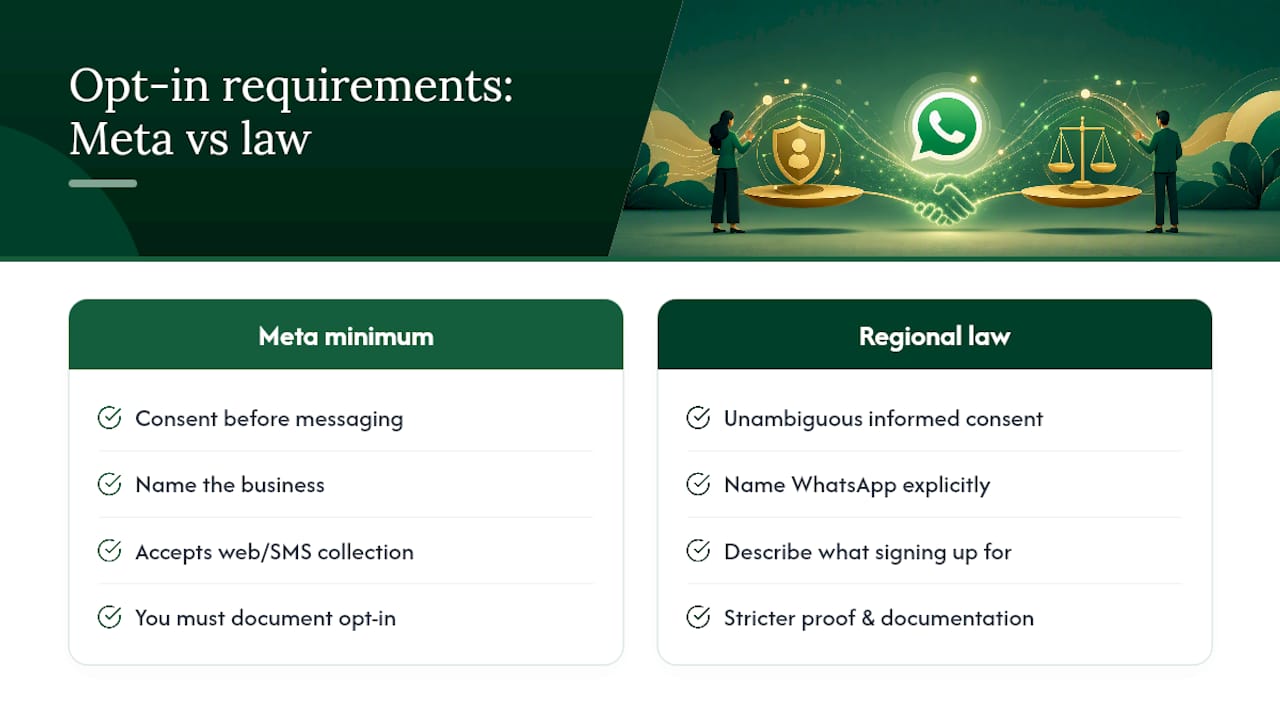
Here’s the nuance that catches experienced teams out: Meta’s actual required minimum is genuinely narrower than what most compliance guides claim, but that gap between minimum and best practice is exactly where legal exposure lives. Regional privacy law rarely settles for “clear agreement and a business name.” GDPR requires an unambiguous, informed, and freely given indication of consent, which in practice means naming WhatsApp specifically and describing what the customer is signing up for. India’s data protection framework and similar regimes elsewhere push in the same direction. If you operate across borders, design your opt in flow to the stricter regional standard, then treat Meta’s minimum as the floor everyone else already cleared.
What should your WhatsApp opt-in consent copy say?
Five elements separate a defensible opt in from one that falls apart under scrutiny: who is messaging, which channel, what kind of messages, roughly how often, and how to stop. Miss any one of these and you’re relying on the customer’s goodwill rather than documented consent.
Industry guidance converges on the same five-part structure because each piece closes a specific gap:
- Who: naming your actual business, not a generic brand tagline, so the customer knows exactly who is texting them
- Channel: stating “WhatsApp” explicitly, since a customer who agreed to “updates” didn’t necessarily agree to a specific messaging app
- What: describing message types (order updates, promotions, appointment reminders) so you can’t quietly repurpose a transactional opt in for marketing blasts
- How often: giving a rough frequency expectation, which also protects you from spam complaints
- How to stop: a clear, working opt-out instruction, usually a reply keyword like STOP
This structure lines up with what industry synthesis on WhatsApp opt in collection recommends across checkout, website, and ad-driven capture points.
Here’s how that looks in practice across common capture points:
Capture point Sample consent copy Checkout checkbox “Yes, send me order updates and occasional offers from [Business] on WhatsApp. Message frequency varies. Reply STOP anytime.” Website signup form “By submitting, you agree to receive appointment reminders and promotions from [Business] via WhatsApp. Reply STOP to opt out.” CTWA first message “Thanks for reaching out! To keep chatting and get updates from [Business] on WhatsApp, reply YES. Reply STOP anytime to leave.” QR code prompt “Scan to join [Business] WhatsApp updates. You’ll get [message type] roughly [frequency]. Text STOP to unsubscribe.” Double opt-in confirmation “You’re almost in. Reply CONFIRM to receive [message type] from [Business] on WhatsApp, or ignore this message to skip.”A few rules apply across every one of these: never use a pre-checked box, because that removes the “freely given” element regulators look for. Keep consent separate for different message categories, since agreeing to shipping notifications isn’t agreeing to marketing. And build opt-out instructions in the customer’s own language, not just English, if you’re messaging a multilingual audience.
Where should you collect WhatsApp opt-ins?
The highest-converting opt in moments are the ones already embedded in a transaction, not a cold ask bolted onto an unrelated page. Checkout and post-purchase flows consistently outperform standalone signup forms because the customer is already engaged and expecting a follow-up.
- Checkout checkbox. Placed right before order confirmation, this converts well because the customer is mid-transaction and primed to expect updates. Keep it unchecked by default and tie the copy to order status messaging specifically.
- Thank-you page after purchase. A slightly softer ask than checkout itself, useful for stores that don’t want to add friction during payment.
- Website widget or popup. Works best when tied to a concrete incentive, like early access to a sale, rather than a generic “join our list” prompt.
- Click to WhatsApp ads (CTWA). These open a session, but that session doesn’t automatically become durable marketing consent; you still need explicit confirmation inside that first chat.
- QR codes at physical locations or on packaging, useful for retail and hospitality businesses wanting a low-friction bridge from offline to WhatsApp.
- Keyword reply via SMS, where a customer texts a word like JOIN to a shortcode, which doubles as a clean audit trail since the message itself is the consent record.
- In-person or point-of-sale capture, where staff ask directly and log consent through a tablet or POS integration.
- Migration from existing SMS or email lists, which requires fresh, WhatsApp-specific consent rather than assuming an existing subscriber automatically transfers.
Every one of these needs source metadata captured alongside the opt in itself: which page, which campaign, which staff member, which exact form. Without that context, a consent record is just a phone number with no defence behind it.
For anything feeding a high-value list, cross-border audience, or a jurisdiction with stricter privacy law, add a double opt-in step. Yes, it costs you some conversion volume upfront. It also means every contact on that list has actively confirmed twice, which is a much stronger position to be in if a regulator or Meta’s review team ever asks questions.
Pro Tip: Run your QR code and keyword-reply channels with slightly different consent wording from your web forms. If you ever need to trace where a compliance gap came from, having distinct wording per channel makes the audit trail obvious instead of guesswork.
What records do you need to prove a valid opt-in?
Seven fields make an opt in defensible: phone number in E.164 format, timestamp, capture method, exact consent wording, source URL or context, stated purpose, and current opt-out status. Miss the exact wording field and you’ve got a name and a date with nothing to actually prove what the customer agreed to.
Practical guides on building a compliant WhatsApp opt in list converge on that same core structure, because each field answers a specific question an auditor or a regulator will ask:
- Phone number (E.164 format) ties the record unambiguously to one number, avoiding formatting mismatches across systems
- Timestamp establishes exactly when consent was given, which matters if policy or law changed since
- Capture method shows whether this came from checkout, a form, a QR scan, or a keyword reply
- Exact consent text is the single most important field, because capturing verbatim wording rather than a paraphrase is what makes a record defensible under audit
- Source URL or context links the record back to the specific page or campaign
- Purpose documents whether this was transactional, marketing, or both
- Opt-out status flags immediately if the customer has since withdrawn consent
Beyond the core seven, recording IP address, form ID, staff ID for in-person capture, and a campaign tag adds useful forensic detail without being strictly required. These extras help you diagnose disputes faster and segment your list more precisely.
On retention: keep consent records for as long as you’re actively messaging that contact, plus a reasonable buffer after they unsubscribe, in case a complaint surfaces after the fact. Store records somewhere you can pull a single contact’s full history quickly. If Meta or a regulator asks for proof on a specific number, the businesses that struggle are the ones whose consent data lives scattered across spreadsheets, ad platforms, and a CRM that doesn’t talk to any of them.
What’s the practical checklist for staying compliant?
Six checks catch most of the problems before they become account-level issues. Run through these before launching or auditing any WhatsApp messaging program:
- Opt in is collected through a channel you control directly, not inherited from a third party’s list
- Your business name appears clearly in the consent language, not just a logo or generic brand voice
- The channel (WhatsApp specifically) and message types are named, not left implicit
- Opt-out instructions are visible, working, and tested end to end
- Every opt in event is logged with timestamp, source, and exact wording
- Frequency expectations are set and roughly honoured, not wildly exceeded
The mistakes that trigger enforcement tend to repeat across businesses of every size. Pre-checked consent boxes remain common despite being a clear compliance failure. Bundling marketing consent inside a transactional opt in, so a shipping notification signup quietly becomes a promotions list, is another frequent trap. Ignoring STOP replies, even accidentally through a broken automation, gets flagged fast by customers and by Meta’s systems alike. And importing old contact lists from email or SMS without fresh, WhatsApp-specific proof is treated as a policy violation, not a grey area.
Pro Tip: Check your quality rating weekly, not monthly. A slow drift downward is much easier to fix before it hits the threshold that restricts your sending tier.
Watch your quality rating and block/report rates as your early warning system. A rating slipping from green to grey is often the first visible sign that your opt in practices, not your message content, need attention.
How Wattle helps you capture and prove WhatsApp opt-in
Manually tracking consent across a website form, a checkout flow, and an in-store tablet is where most of the record-keeping problems above actually happen. Wattle’s platform is built to close that gap by capturing consent at the point of contact and storing it automatically, rather than relying on someone remembering to log it later.
On the capture side, The website widget can present a WhatsApp opt in prompt during a live chat, a checkout integration can attach consent to the order flow itself, and an automated welcome template can confirm the opt in the moment a customer engages, whether that first contact came through a QR code, an ad click, or a walk-in conversation logged by staff.
On the record side, conversations land in one unified inbox tied to a contact profile. That means:
- Consent events get logged as part of the contact’s activity timeline, not buried in a separate spreadsheet
- Audit-relevant details, including timestamp and source, are attached to the record automatically
- Exportable contact fields make it straightforward to pull consent proof for a specific number if you’re ever asked
A typical flow looks like this: a customer ticks the WhatsApp opt in box at checkout, receives an automated welcome template confirming what they’ve signed up for, and that proof sits in their contact record from that point forward. When your marketing team segments a list for a promotional send, they’re working from contacts with real stored consent, not a guess.
Three things marketing teams should do this week
Start with an audit, not a rewrite. Pull your last 90 days of WhatsApp sends and check whether every recipient has a documented opt in with exact wording attached. Most teams find gaps they didn’t expect, usually from an old list migration or a checkout flow that never quite captured consent properly.
Once you’ve found the gaps, instrument proof before you touch messaging volume. It’s tempting to fix consent copy and keep sending at the same pace, but a broken record-keeping system will keep generating the same audit risk regardless of how good your new opt in language is. Fix the capture and storage mechanism first.
Then run two template tests, one with minimal Meta-compliant wording and one with the fuller five-element version naming WhatsApp explicitly. Compare not just opt in rate but complaint and block rate over the following fortnight. That data will tell you more about your specific audience than any general benchmark could.
If you’re messaging across borders, particularly into the EU or India, get privacy or legal involved before scaling a list, not after a complaint arrives. Regional consent standards are usually stricter than Meta’s floor, and retrofitting compliance across an existing list is far more painful than building it in from the start.
— Christopher
Wattle: capture opt-ins, store proof, and automate the follow-up
The platform is an alternative to stitching together a checkout plugin, a separate consent spreadsheet, and a website form that don’t talk to each other. Instead of chasing proof across three systems when an audit or a Meta review lands on your desk, every WhatsApp opt in captured through the web widget, checkout integration, or in-person flow lands straight into one contact record, with the timestamp and exact wording already attached.
That unified inbox handles the welcome template that confirms the opt in, the ongoing conversation once a customer replies, and the human handoff if something needs a person’s judgement rather than an automated response. For a business trying to build a WhatsApp messaging program that survives a compliance check without weeks of manual reconciliation, that’s the practical difference: less time reconstructing consent history, more time actually messaging customers who’ve agreed to hear from you. Businesses running similar consent-driven communication flows have found value in resources like WhatsApp opt in guidance for recruiters and transparent consent design for sensitive communications, both of which reinforce the same principle Wattle builds into its capture flows.
If your current opt in process relies on someone remembering to export a spreadsheet before a review, it’s worth seeing how Wattle’s platform handles that automatically. Book a demo and walk through your own checkout or website flow to see where the proof gaps are.